
Best Laptop 2026 for Students and Everyday Use: Complete Buying Guide & Top Picks
Looking for the best laptops in 2026? Compare HP, Dell, ASUS, Acer, Lenovo, Samsung, and Apple laptops for students, office work, multitasking, and everyday use. Find the right laptop based on performance, battery life, portability, and value.
Buying the wrong laptop usually goes wrong in one of two ways. Either you overspend on power you will never use, or you save money today and end up needing an upgrade far sooner than expected.
The smarter way to buy a laptop in 2026 is to match it to how you actually work, and more importantly, how you expect that work to change over the next two to three years. That is the key idea behind this guide.
After comparing a large range of laptops across brands like HP, Dell, ASUS, Acer, Lenovo, Samsung, and Apple, a few patterns become very clear. For basic users, value matters more than flashy specs. For students and professionals, battery life, portability, and enough memory for multitasking matter far more than marketing labels.
How to Choose the Best Laptops 2026 for Your Needs
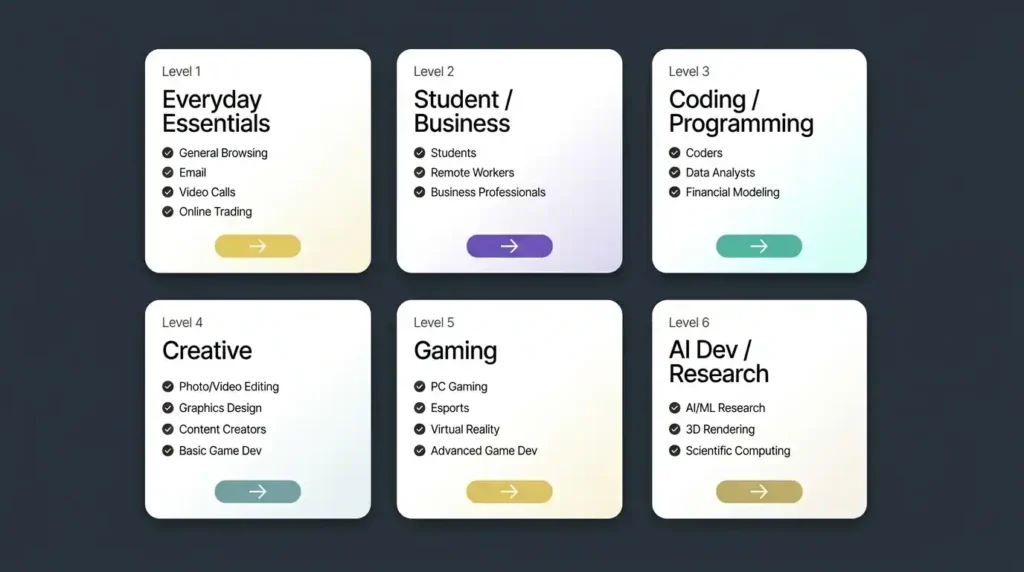
Think of laptop buyers in six broad levels. As you move up those levels, both the performance requirements and the price rise.
This article focuses on Level 1 and Level 2 users, which covers most people shopping for a laptop for students, business productivity, work from home, and everyday use.
- Level 1: Basic everyday use like browsing, email, video calls, office work, and light documentation
- Level 2: Students, remote workers, and professionals who multitask heavily across browsers, office apps, calls, and occasional light creative work
There is one rule that can save you money in the long run. Do not buy only for your current needs. Buy for the next two to three years.
If more than roughly 30 percent of your future work is likely to spill into the next level, it makes sense to move up now. For example, if basic coursework is your main task today but you expect to start coding, editing, or more demanding software soon, buying too low will almost certainly mean replacing the laptop early.
At the lowest end, even a tablet with a keyboard and mouse can work for some users. At the very high end, desktops often offer better power for money. But in the middle, laptops remain the best balance of flexibility and portability.
Best Laptop 2026 Buying Rules: Features You Should Never Compromise On
If the budget is tight, every spec starts looking negotiable. In reality, a few parts matter much more than others.
1. Choose a Strong CPU and Enough RAM
The processor and memory will have the biggest impact on how usable your laptop feels over time. These two decide whether the machine still feels competent two years later or starts struggling with routine tasks.
For this category of laptops, underpowered RAM is one of the most common mistakes. A machine may look attractive because of the brand name or sleek design, but if it ships with only 8GB and no practical upgrade path, it can become limiting surprisingly fast.
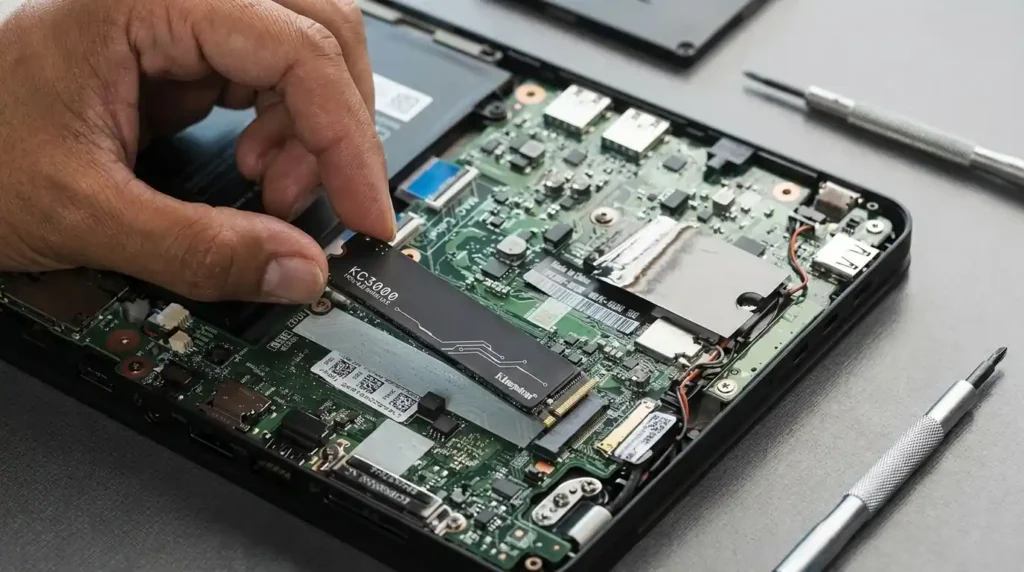
2. Why SSD Storage Is Essential in 2026
Storage is one place where compromise is acceptable, but only to a point. You can start with lower capacity storage if needed, but it should still be an SSD. Avoid hard drives entirely.
Even a smaller SSD gives a much better everyday experience than a larger HDD. Capacity can be managed later with upgrades or external storage. Speed and responsiveness are much harder to fake.
3. How Important Is Display Quality?
If you are not editing photos or video, the screen does not have to be premium. A basic display is fine for browsing, office tasks, and study work. If needed, an external monitor can always be added later.
Best Laptop 2026 Specifications for Basic Everyday Use
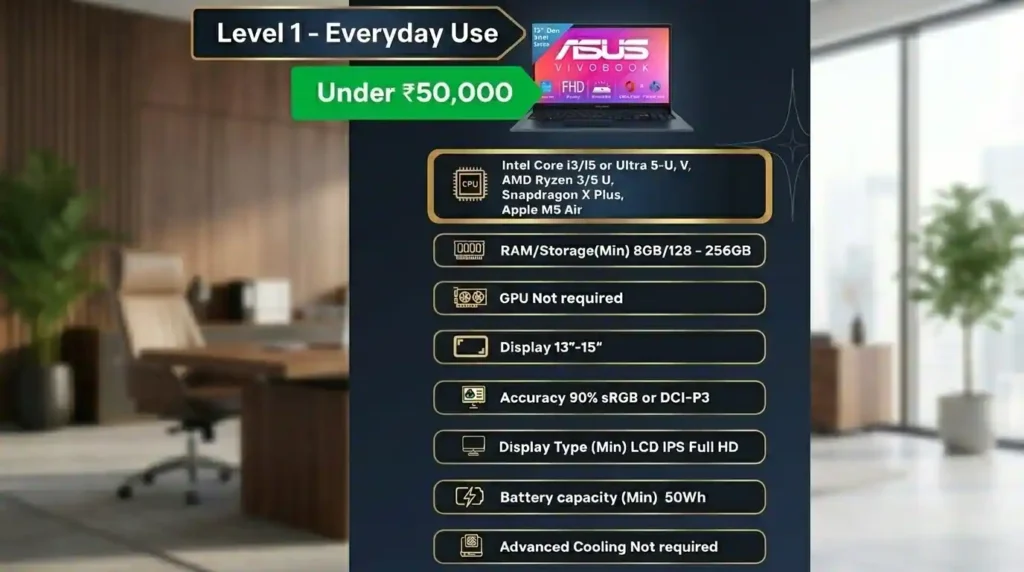
Level 1 is all about essential performance at the lowest sensible cost.
This category includes:
- General browsing
- Video calls
- Basic office work
- Light business software such as tally or Zoho
- No gaming
- No serious creative work
For this type of use, a good starting point looks like this:
- Processor: Entry to mid-tier Intel, AMD, or Snapdragon chips designed for efficiency
- RAM: Minimum 8GB, but 16GB is strongly preferred
- Storage: Minimum 128GB SSD
- Focus: Low cost, decent reliability, enough memory for basic multitasking
If your needs are truly minimal, a tablet plus accessories can also make sense here.
Best Laptop 2026 Specifications for Students and Multitasking
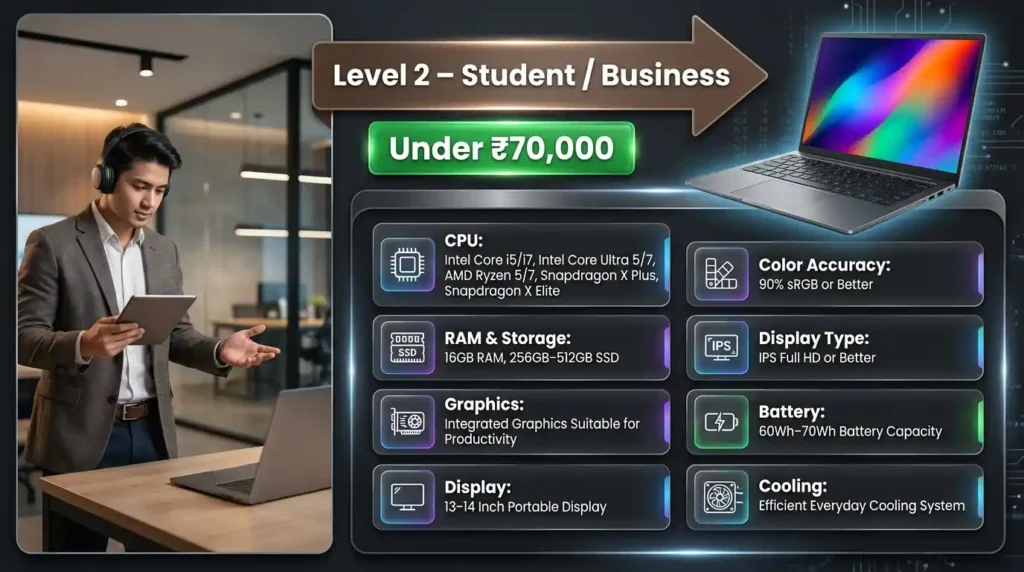
Level 2 is where many students and business users sit today. This is no longer just casual use. It involves running many browser tabs, office apps, meetings, and occasional heavier productivity work.
This category includes:
- Students
- Remote workers
- Business professionals
- Frequent browser multitasking
- Office 365 and similar productivity apps
- Regular video calls
- Light creative work
Here, the priorities shift.
- Battery: Around 60Wh to 70Wh is a good target
- Expected runtime: Roughly 4 to 8 hours for light work, depending on usage
- Weight: Under 1.5 kg is ideal
- Display size: 13 to 14 inches is easiest to carry, though 15-inch models can still be worthwhile if performance matters more
- RAM: 16GB is the sweet spot
Best Laptops 2026 Under ₹50,000
Laptop prices have climbed noticeably. What used to sit comfortably near ₹40,000 now often pushes past ₹50,000. So the goal in this segment is not perfection. It is getting the best balance of price, usability, and longevity.
Acer Aspire Lite 15 Review
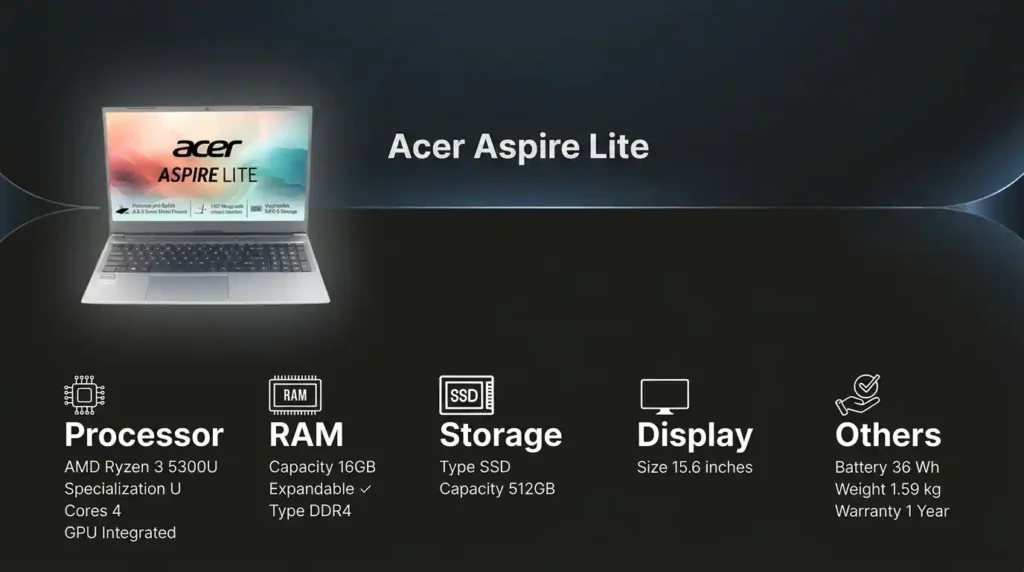
This is one of the better budget picks for a simple reason. Most laptops at this price settle for a plastic build and 8GB RAM. This one stands out with a metal body and 16GB RAM, plus memory expansion up to 32GB.
The Ryzen 3 chip here is enough for:
- Browsing
- Documents
- Video calls
- Light multitasking
Pros
- Metal chassis in a budget segment
- 16GB RAM out of the box
- Expandable memory
- Good value for everyday work
Cons
- The processor is quite old
- Not the right choice for users expecting heavier workloads later
Who it is for: A pure Level 1 buyer who wants the most sensible value and does not care about cutting-edge processing power.
ASUS Vivobook 15 Review
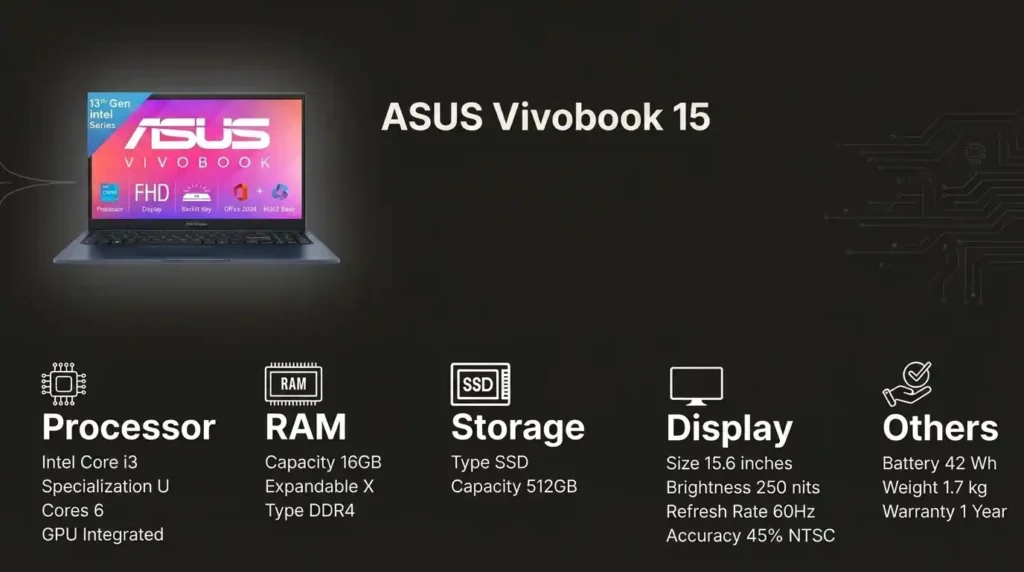
This is a very strong budget option because it combines an Intel Core i3 13th Gen, 16GB RAM, and 512GB SSD. That is a practical config for lightweight use and gives it better breathing room than many similarly priced machines.
The anti-glare display also helps during long indoor work sessions.
Pros
- Good modern processor for basic use
- 16GB RAM is a major plus at this price
- 512GB SSD offers comfortable storage
- Anti-glare screen improves day-to-day comfort
Cons
- Plastic build quality
Who it is for: Buyers who want a dependable Level 1 laptops with a more current processor and enough RAM to avoid frustration.
HP 15 Laptop Review
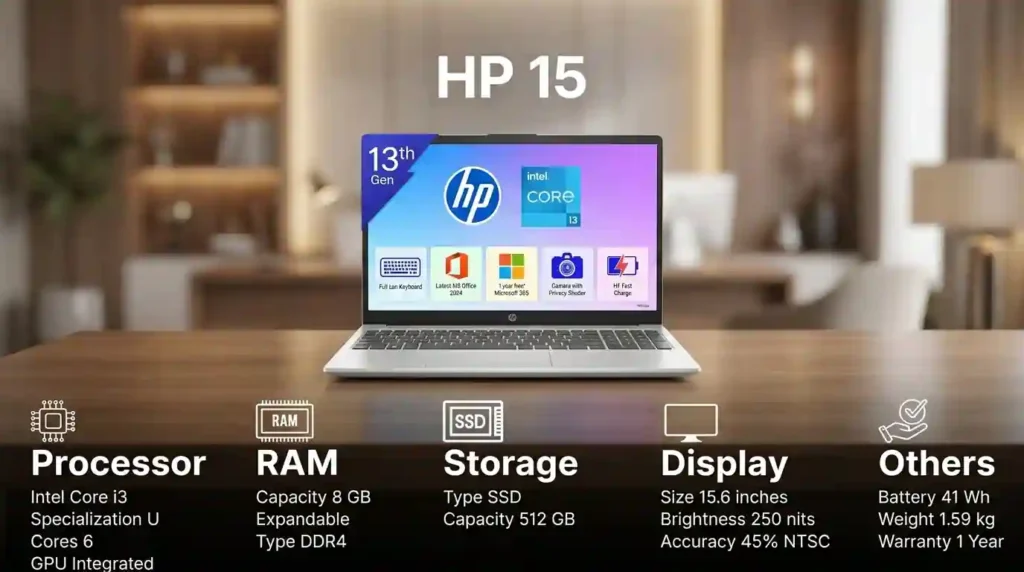
The HP 15 uses an Intel Core i3 13th Gen, so on paper it looks competitive. The issue is the 8GB DDR4 RAM.
That amount of memory can get consumed quickly. Open a browser with many tabs, add Office 365, then join a video call, and the system can start feeling squeezed.
Pros
- Recognizable HP branding
- Suitable for light everyday work
Cons
- 8GB RAM is limiting
- RAM upgrade adds extra cost
- Less attractive overall than stronger value alternatives
Who it is for: Someone who strongly prefers the HP brand and is comfortable either keeping workloads light or paying extra for a memory upgrade.
Best laptops under ₹70,000
This range is where things get much more interesting for students and business professionals. Here you can find machines that feel significantly better for multitasking, coding, office work, and even some light editing.
Lenovo V15 G4 Review
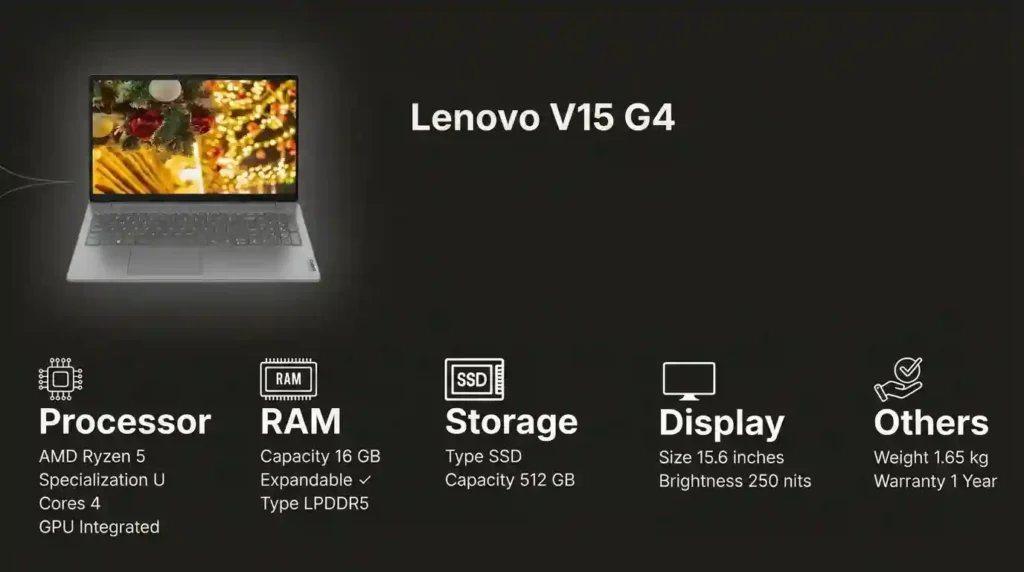
The Lenovo V15 G4 pairs an AMD Ryzen 5 with 16GB DDR5 RAM, making it a strong everyday productivity machine.
One of the biggest benefits here is the 1-year on-site warranty, which means service comes to you rather than requiring a trip to a service center.
Pros
- 16GB DDR5 RAM
- Good performance for study and office work
- Useful on-site warranty support
Cons
- Plastic V-series build
- Service support may be average outside major cities
Who it is for: Students and professionals who want substance over style and value practical reliability.
HP Professional 14 Review
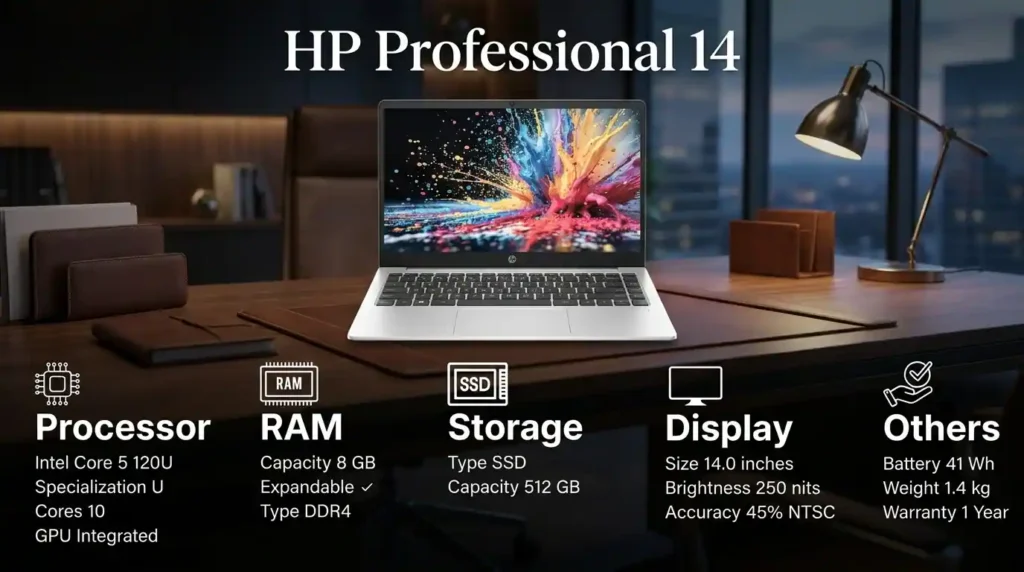
This one is appealing because of its 14th Gen Intel Core 5 processor, 1.4 kg weight, backlit keyboard, and fingerprint reader. Those features give it a more premium business-laptop feel.
The sticking point again is the 8GB RAM. While it can be upgraded, memory upgrades are not cheap, and that affects overall value.
Pros
- Lightweight and portable
- Backlit keyboard
- Fingerprint reader
- Good for light office tasks
Cons
- Only 8GB RAM by default
- Upgrade cost hurts value
- Not ideal for heavier spreadsheets, analytics, or development work
Who it is for: Someone who prioritizes portability and business features over heavier multitasking performance.
ASUS Vivobook 15 Core i5 Review
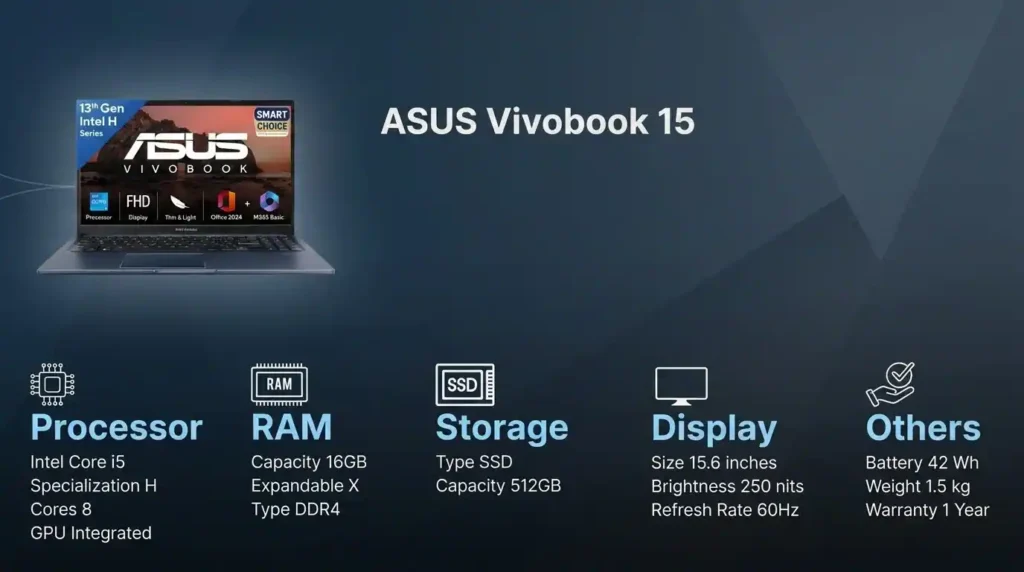
This is where the Vivobook line becomes especially compelling. With an Intel Core i5 13th Gen H-series processor, 16GB RAM, and 512GB SSD, it can handle much more than basic productivity.
It is well suited for:
- Heavy multitasking
- Coding
- 1080p video editing
- Demanding office workloads
The trade-off is easy to predict. Putting a higher performance chip inside a slim chassis means more heat, and under sustained load the fans will be noticeable.
Pros
- Excellent performance for the price
- 16GB RAM and 512GB SSD
- Handles more demanding productivity work comfortably
Cons
- Plastic build
- Fan noise under heavier sustained use
Who it is for: Anyone who wants the most performance possible in this budget and is willing to accept a less premium build.
Dell Pro 14 Review
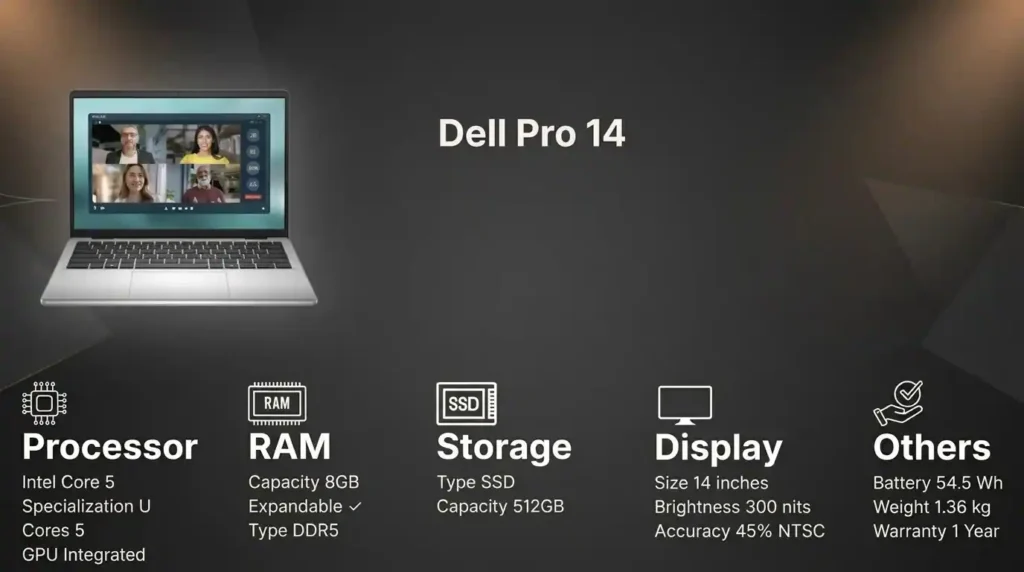
The strongest reason to buy the Dell Pro 14 is the 3-year warranty. For buyers who care deeply about long-term support, that alone makes it worth considering.
Its config with a Core i5, 8GB DDR5 RAM, 512GB SSD, and 1.4 kg weight is fine for lighter workloads, but not ideal for serious multitasking unless you pay to upgrade memory.
Pros
- Excellent 3-year warranty coverage
- Portable and light
- Good for basic office and everyday use
Cons
- 8GB RAM limits multitasking headroom
- RAM upgrade costs extra
Who it is for: A lighter-use buyer who values Dell support and peace of mind more than raw value on paper.
Dell Vostro 3530 Review
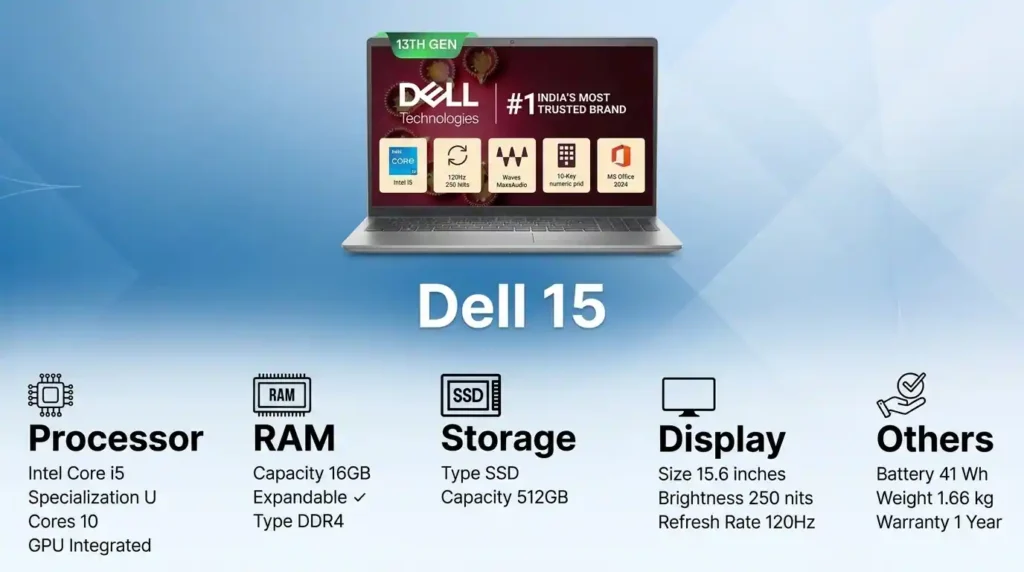
If the Dell Pro 14 feels a bit too constrained, the Dell Vostro 3530 is a better balanced option for a bit more money. It gives you a 13th Gen Intel Core i5, 10 cores, 16GB RAM, and 512GB SSD.
Pros
- Much better RAM configuration than the Pro 14
- Better suited for multitasking
- A sensible Dell option for productivity users
Cons
- Costs more than the Pro 14
Who it is for: Buyers who prefer Dell but want performance that feels more future-proof.
Samsung Galaxy Book 4 Review
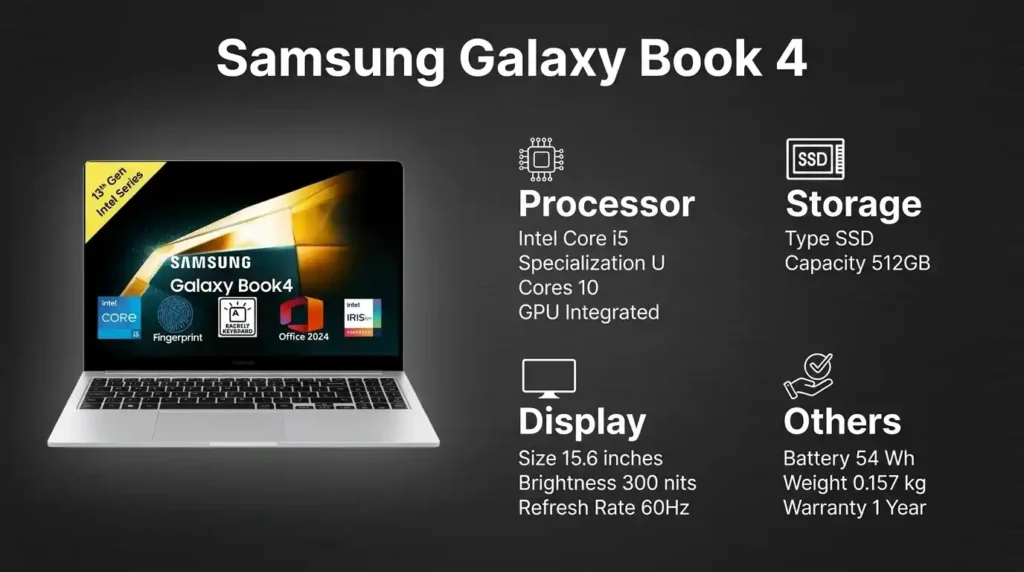
This is one of the nicer all-rounders in the segment if premium feel matters to you. The fully metal chassis gives it a more upscale finish than many competitors.
With an Intel Core i5 U-series processor, 16GB RAM, and 512GB SSD, it is a solid daily driver for students and business users. The fingerprint reader and backlit keyboard are nice practical touches.
Pros
- Premium all-metal build
- 16GB RAM and 512GB SSD
- Good for daily productivity
- Useful premium features
Cons
- Not a gaming machine
- Not meant for serious creative workloads
Who it is for: Students and professionals who want a refined, premium-feeling laptop for mainstream use.
Lenovo IdeaPad Slim 3 Review
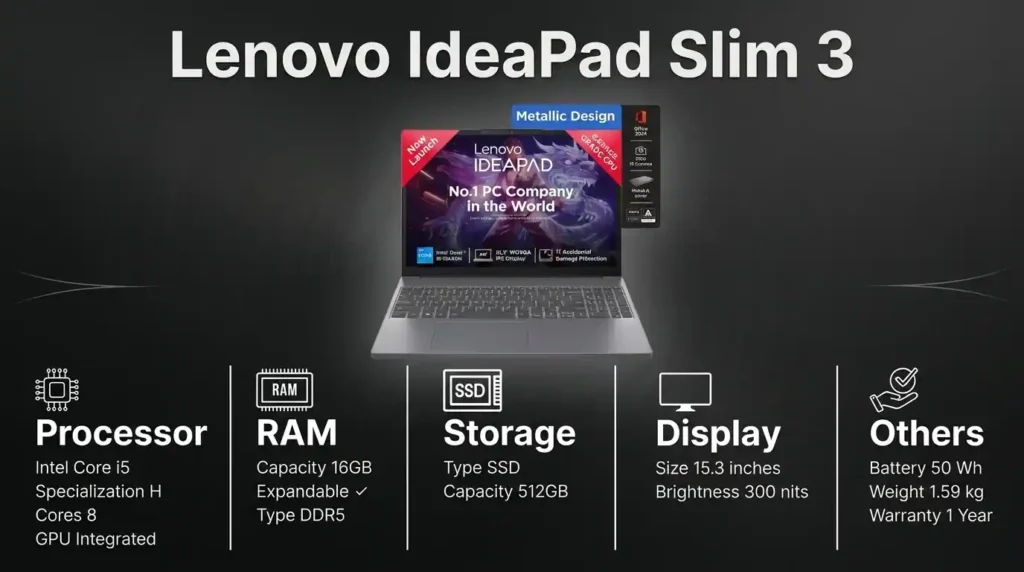
This model stands out for its 16:10 display aspect ratio. That extra vertical screen space can make browsing, writing, reading, and document work feel more comfortable than the standard 16:9 layout.
It also combines an 8-core Intel i5, 16GB RAM, and 512GB SSD, which makes it responsive and productivity focused.
A useful bonus is warranty coverage that includes accidental damage protection.
Pros
- Excellent screen format for productivity
- 16GB RAM and 512GB SSD
- Strong overall responsiveness
- Accidental damage protection adds value
Cons
- No major drawback was highlighted beyond normal segment limitations
Who it is for: Students and professionals who care about productivity, comfort, and a practical feature set.
HP OmniBook 5 OLED Review
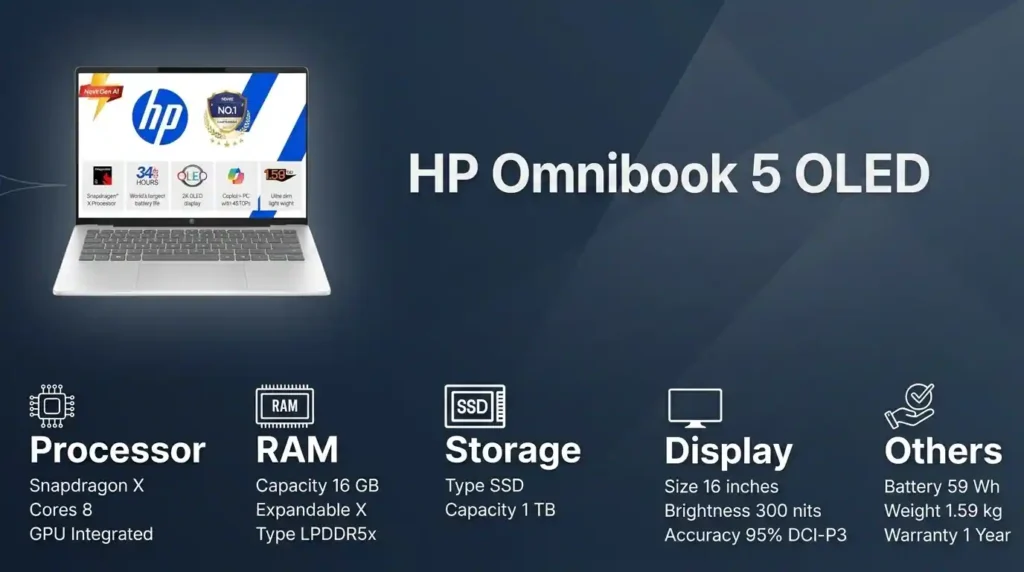
At a slightly higher price point, this is one of the most interesting laptops here. It offers a 2K OLED 16-inch display and uses a Snapdragon X processor.
The headline feature is battery life. This machine can deliver exceptionally strong endurance, with real promise for all-day use.
The catch is app compatibility. Major software such as Office, Chrome, and Adobe is generally fine, but niche enterprise tools or certain specialized plugins may not be.
Pros
- Excellent battery life
- Beautiful OLED display
- Good option for mobile productivity
Cons
- Snapdragon compatibility can still be inconsistent for specialized software
Who it is for: Buyers who want maximum battery life and a premium screen, and who have already verified that their apps work properly on Snapdragon.
Best Laptop 2026 MacBook Options for Students and Professionals
If you are already inside the Apple ecosystem, the buying logic changes a bit. The hardware and software integration is a genuine advantage, but memory configuration becomes even more important because upgrades are not possible later.
MacBook Neo Review
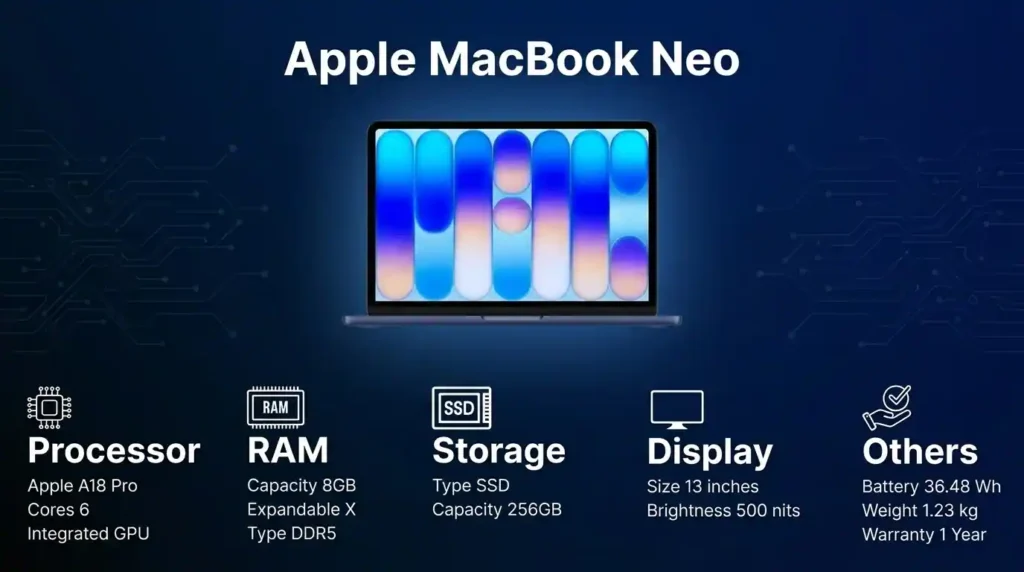
This is positioned as an entry-level MacBook for basic use. It uses the A18 Pro chipset, keeps the weight down to around 1.2 kg, and has a 13-inch display. Portability is one of its biggest strengths.
For web browsing, media, and document work, the performance is more than enough. Battery life is also a strong point.
The real limitation is the 8GB memory, which cannot be upgraded.
Pros
- Very portable
- Strong battery life
- Smooth Apple ecosystem experience for basic tasks
Cons
- Only 8GB memory
- No upgrade path
- Can feel restrictive beyond simple use
Who it is for: Level 1 Apple users who want a lightweight Mac primarily for basics.
MacBook Air 13-inch and 15-inch Review
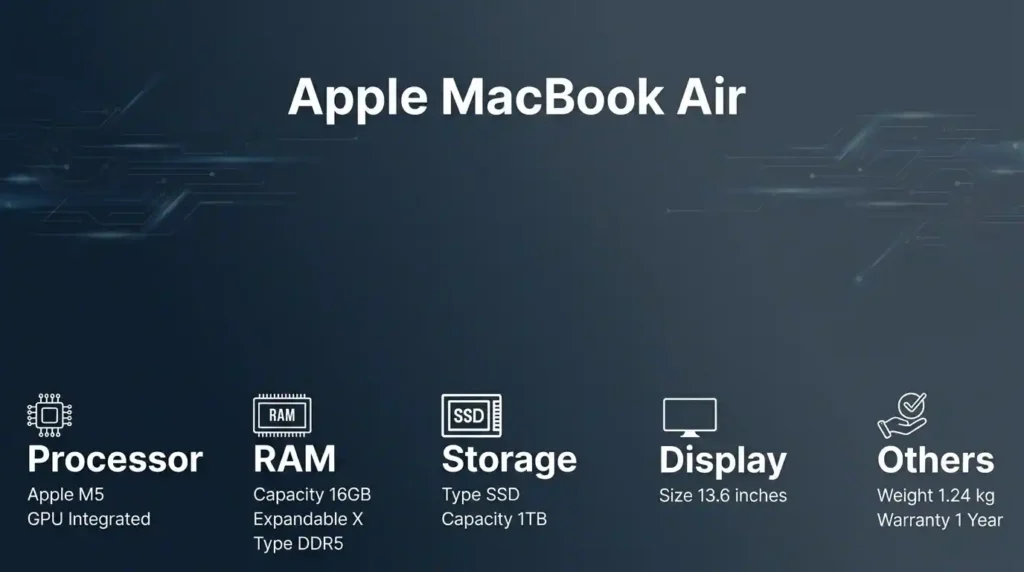
For students and business professionals, the better Apple recommendation is the MacBook Air. The M5 chip offers excellent efficiency, battery life beyond 10 hours on a charge, and silent operation thanks to its fanless design.
It also comes with a Liquid Retina display, full sRGB color coverage, 16GB RAM, and SSD storage starting at 512GB. That makes it far more appropriate for long-term student or productivity use.
Between the nearby generations, if the price difference is small, the newer option makes more sense.
Pros
- Excellent battery life
- Silent fanless design
- Strong display quality
- 16GB RAM is much more practical
- Great fit for students and professionals
Cons
- Apple pricing remains premium compared to Windows alternatives
Who it is for: Students and business users who want the best balanced MacBook for portability, battery life, and longevity.
Best Laptop 2026 Brand Comparison: HP vs Dell vs ASUS vs Acer vs Lenovo vs Samsung vs Apple
If all the specs start blurring together, this is the easiest way to narrow the list.
- Choose Acer if value matters most and you want the strongest spec sheet possible at the low end
- Choose ASUS if you want aggressive performance for the money, especially in the Vivobook range
- Choose HP if you like the brand and business-style features, but check RAM carefully before buying
- Choose Dell if warranty, support, and brand reliability matter more to you than perfect value
- Choose Lenovo if you want practical, productivity-first machines with sensible configurations
- Choose Samsung if premium build and mainstream productivity are your main priorities
- Choose Apple if you are already in that ecosystem and are willing to pay more for battery life, polish, and integration
Best Laptops 2026 Recommendations by User Type
Best for pure budget everyday use
ASUS Vivobook 15 and Acer Aspire Lite 15 are the strongest value picks under ₹50,000, depending on whether you prioritize newer processing or better build plus memory value.
Best for students and multitasking
Lenovo V15 G4, ASUS Vivobook 15 Core i5, and Lenovo IdeaPad Slim 3 are the most sensible Windows choices for longer-term use.
Best premium-feeling Windows option
Samsung Galaxy Book 4 is a great fit if you want something that feels more polished in hand.
Best battery-first Windows option
HP OmniBook 5 OLED, but only after checking software compatibility with Snapdragon.
Best MacBook for basic use
MacBook Neo, only if your workload is truly light.
Best MacBook for students and professionals
MacBook Air is the clear choice for anyone who wants a practical Apple laptop for the next few years.
Best Laptops 2026: Final Verdict
A laptop is not just a purchase for today. It is a purchase for the next two to three years of your work, study, and habits.
So before comparing brands, ask the more important question. Are you buying for your present self, or for the person you are likely to become over the next few semesters or job cycles?
If you get that part right, the rest of the decision becomes much easier.
Pricing, Affiliate, and Sponsorship Disclosure:
All prices are subject to change and may be higher or lower than prevailing market prices. We make no guarantees regarding price accuracy. This content may include affiliate links and/or sponsored placements, through which we may receive compensation. Such compensation does not impact pricing or product representation. Consumers are responsible for verifying final prices with the retailer. 😊 Check: Affiliate Disclosure Page. and check out another social media account: Click Here.