
Top Laptop Buying Guide in 2026: A Complete Guide for Gaming, Design & Professional Work
Explore top Laptop Buying Guide for gaming, video editing, AutoCAD, architecture, design, and professional workloads. Compare leading models and find the right laptop for your needs in 2026.
Buying the wrong laptop usually goes wrong in one of two ways. Either you overspend on specs you will never use, or you save money now and end up needing an upgrade far too soon. The smarter approach is to buy for both your current needs and where your work or hobbies are heading over the next two to three years.
For gaming, editing, AutoCAD, design work, and other heavy workloads, that matters even more. These are not light-use machines. They need enough CPU power, RAM, graphics performance, and cooling to stay useful for years, not months.
This guide focuses on Level 4 and Level 5 users in a six-level laptop framework. In simple terms, these are people doing creative work, gaming, or both. That includes video editors, photo editors, graphic designers, content creators, architects, interior designers, engineers using AutoCAD-like software, and gamers playing modern titles or developing games.
Quick Comparison Table
| Laptop | GPU | RAM | Display | Best For |
|---|---|---|---|---|
| HP Victus | RTX 3050 | 16GB | 144Hz | Budget Gaming |
| Acer Nitro V15 | RTX 5050 | 16GB | 165Hz | Value Gaming |
| HP Omen | RTX 5050 | 24GB | 100% sRGB | Gaming + Editing |
| Lenovo LOQ | RTX 5060 | 16GB | 144Hz | GPU Performance |
| Legion 7 | RTX 5060 | 32GB | OLED 240Hz | Premium All-Rounder |
How We Selected These Laptops
“We compared specifications, display quality, cooling systems, GPU TGP ratings, upgrade options, creator-focused display characteristics, and overall value for money.”
Best Laptop Buying Guide: How to Choose the Right Performance Level
The easiest mistake is buying only for what you do today. A better question is this: what will at least 30 percent of your laptop use look like over the next two to three years?
If you are already planning to move into video editing, 3D work, game development, or serious gaming, it usually makes sense to jump a level now instead of replacing the laptop later.
For these heavier use cases, portability also needs to be questioned honestly. If you do not really need to carry your machine around, a desktop often gives much better performance for the money. Gaming laptops especially come with a portability premium.
Specs You Should Never Compromise On
When budget is tight, not all specs are equally important. Some corners are expensive to cut.
1. Choosing the Right CPU for Long-Term Performance
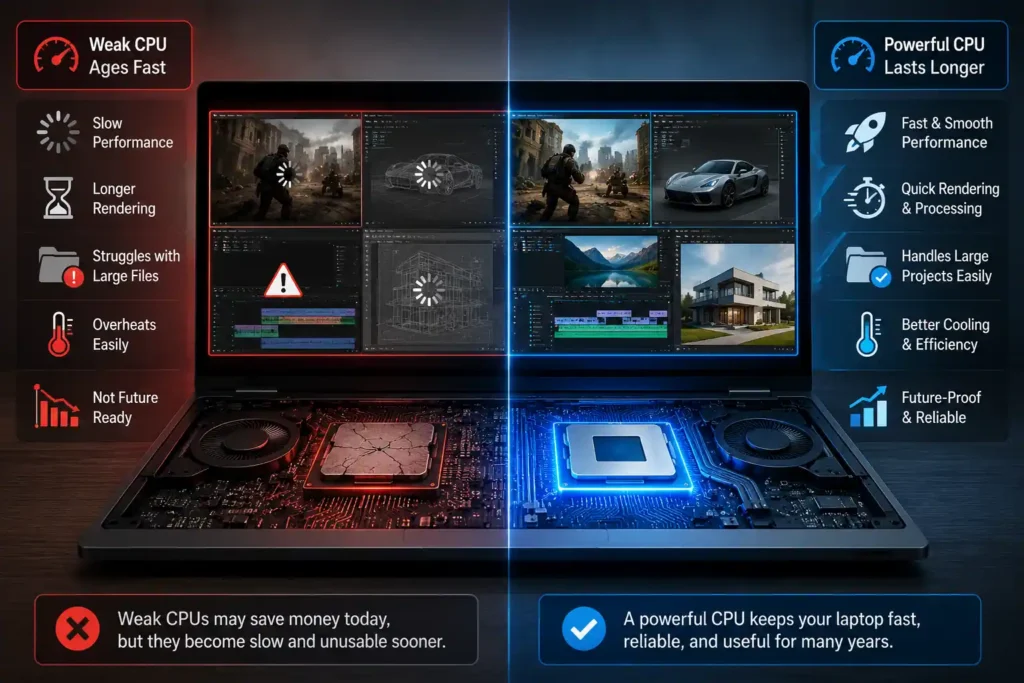
The processor is one of the biggest factors in how long the laptop remains usable. For gaming, rendering, large project files, and design software, weak CPUs age fast.
2. How Much RAM Do You Really Need?
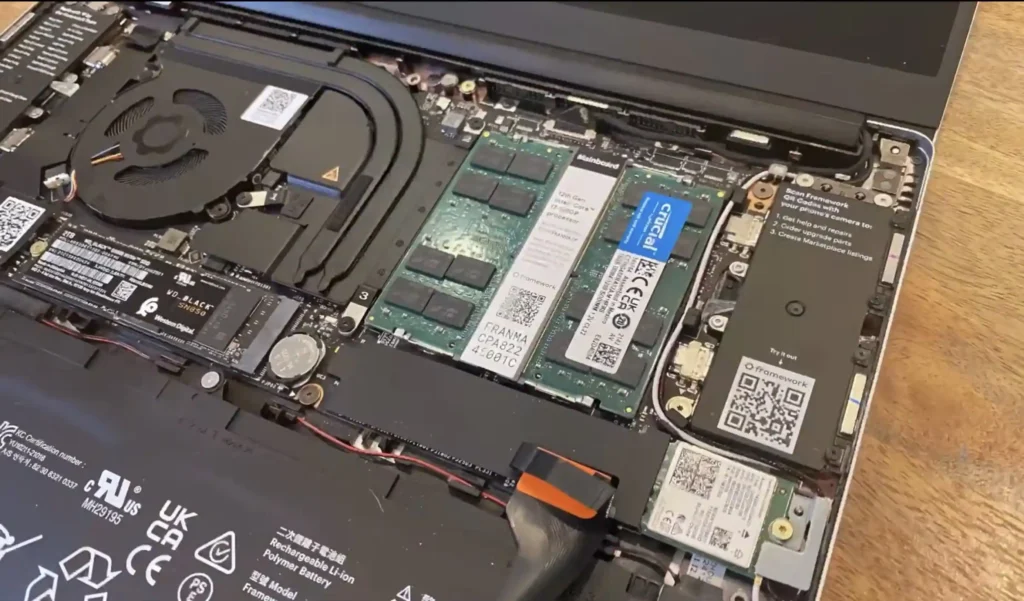
RAM is another no-compromise area. Heavy multitasking, rendering, working with large media files, and modern games all benefit from more memory.
3. Why a Dedicated GPU Matters
If your work includes creative apps or gaming, dedicated graphics are essential. Integrated graphics are simply not enough for the class of machines being discussed here.
4. Cooling and Thermal Performance Explained
Powerful internals mean nothing if the laptop overheats and slows itself down. Sustained workloads like gaming sessions, exports, simulations, and rendering need proper thermal management.
Where You Can Save Money Without Sacrificing Performance
Storage Capacity: How Much Is Enough?
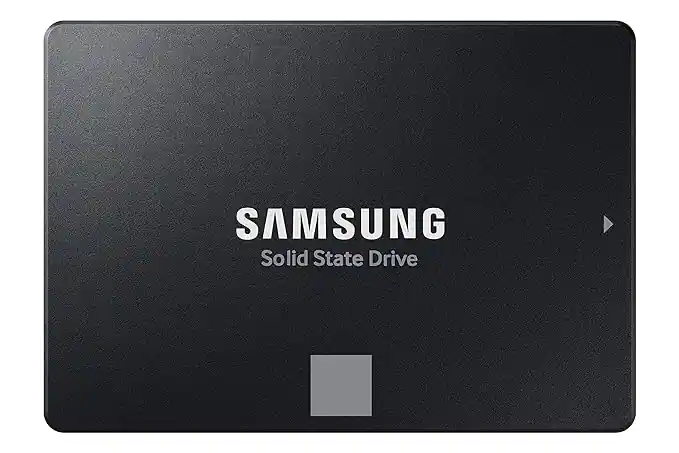
You can start lower on storage if the budget forces it, but it should still be an SSD. Do not buy an HDD-based machine in this category. External SSDs are a workable option later, even if they are not especially cheap right now.
Display Quality: When It Matters Most
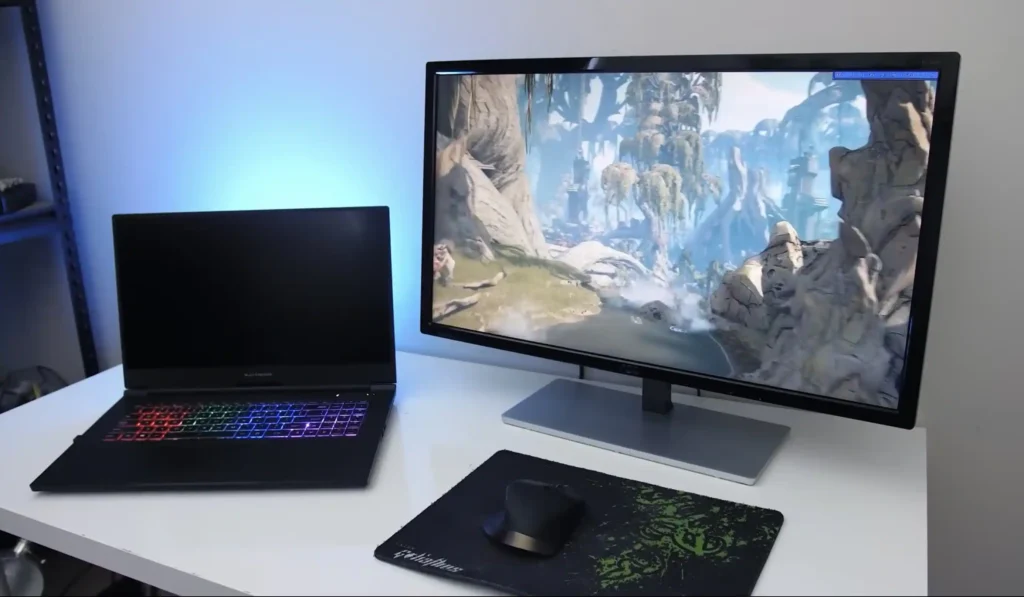
If you are mainly gaming and not doing color-sensitive creative work, you can settle for a less impressive built-in display and plan to add an external monitor later. That compromise is much riskier for editors, designers, and anyone who depends on color accuracy.
Core Specs to Look For in Gaming and Creative Laptops
Creative laptops and gaming laptops need very similar foundations, with a few key differences.
Recommended Processors for Heavy Workloads
- CPU: Go for Intel or AMD H-class or HX-class processors for serious workloads.
- Avoid: Snapdragon for these use cases.
- Mac option: MacBook Pro works for creative work, not as a primary gaming machine.
- RAM: 24GB and above is the safer starting point. 16GB is workable only in lower tiers.
- Storage: 512GB SSD minimum, though 1TB is much more practical.
- Better GPU target: RTX 5060 and above if you want stronger AAA gaming or 4K editing performance.
- VRAM: 6GB is the minimum, 8GB or more is the better target.
Why TGP Matters More Than Most Buyers Think
Do not compare GPUs by name alone. Check the Total Graphics Power, or TGP. A higher-TGP version of the same graphics chip can perform noticeably better in both games and creative workloads.
Display Requirements for Gamers and Creators
- Creative work: Look for 100% sRGB or DCI-P3 color coverage.
- Gaming: Look for at least a 144Hz panel.
- Competitive gaming: 165Hz or higher is preferable.
Features and Specifications to Avoid
- Integrated graphics
- Less than 16GB RAM
- Low refresh rate displays for gaming
Entry-Level Picks for Gaming and Creative Work
This section is for people who want a capable machine for entry-level gaming, lighter editing, and AutoCAD-type work, but not top-end AAA gaming at max settings and not serious 4K-heavy motion graphics workflows.
1. HP Victus budget model
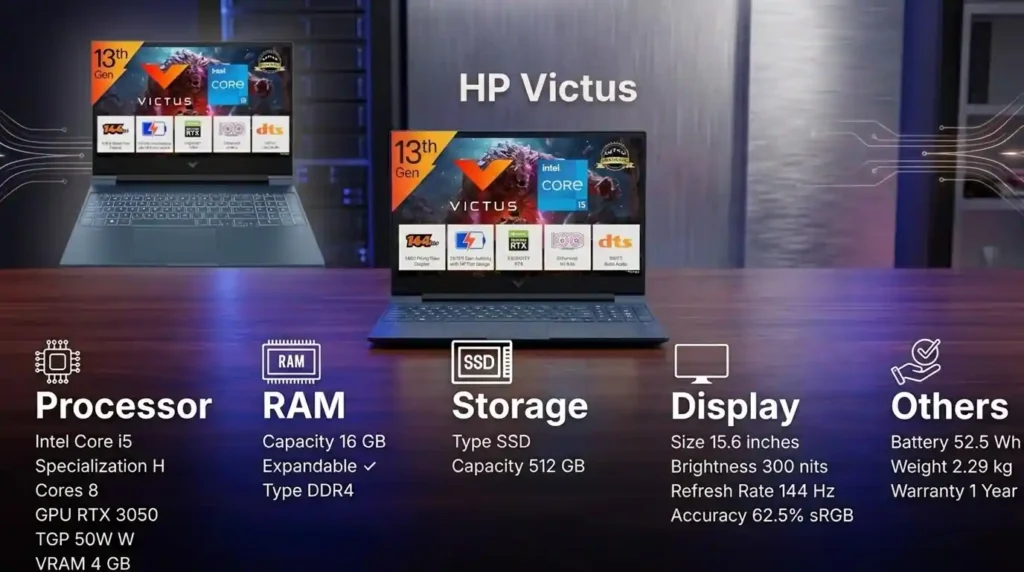
This is the low-budget starting point. It comes with an older RTX 3050 GPU with 4GB VRAM, a 13th gen Intel Core i5 H-series processor, 16GB DDR4 RAM, 512GB SSD, and a 144Hz Full HD display.
What it does well:
- Entry-level 1080p gaming
- Basic editing
- Reasonable starting specs for the price
Limitations:
- Older GPU
- Only 4GB VRAM
- Not suitable for serious AAA gaming
- Not ideal for advanced 4K editing
Who should buy it: Buyers on a very tight budget who need a gaming-capable laptop now and can accept shorter long-term headroom.
Who should skip it: Anyone expecting the laptop to age well under heavier gaming or creative use.
2. Acer Nitro V15
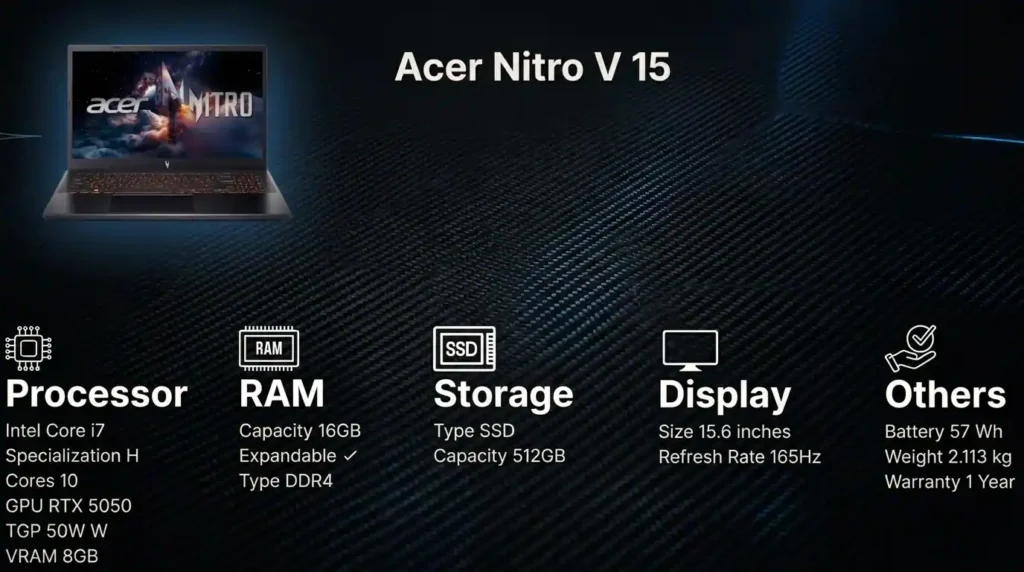
Just under the one lakh mark, this is a much stronger value option. It steps up to an RTX 5050 with 8GB GDDR7 VRAM, adds an Intel Core i7 processor with 10 cores, and includes a 165Hz Full HD display.
Why it stands out:
- Big GPU upgrade over RTX 3050 laptops
- Comfortable 1080p gaming at medium to high settings
- Strong value for the money
Weak points:
- Plasticky build quality
- 512GB storage fills quickly with modern games
- 16GB RAM is adequate, but not generous
Upgrade path: RAM and storage can be improved later, which helps this machine’s long-term value.
Best for: Budget-conscious gamers who care more about performance than premium materials.
3. HP Victus higher-spec model
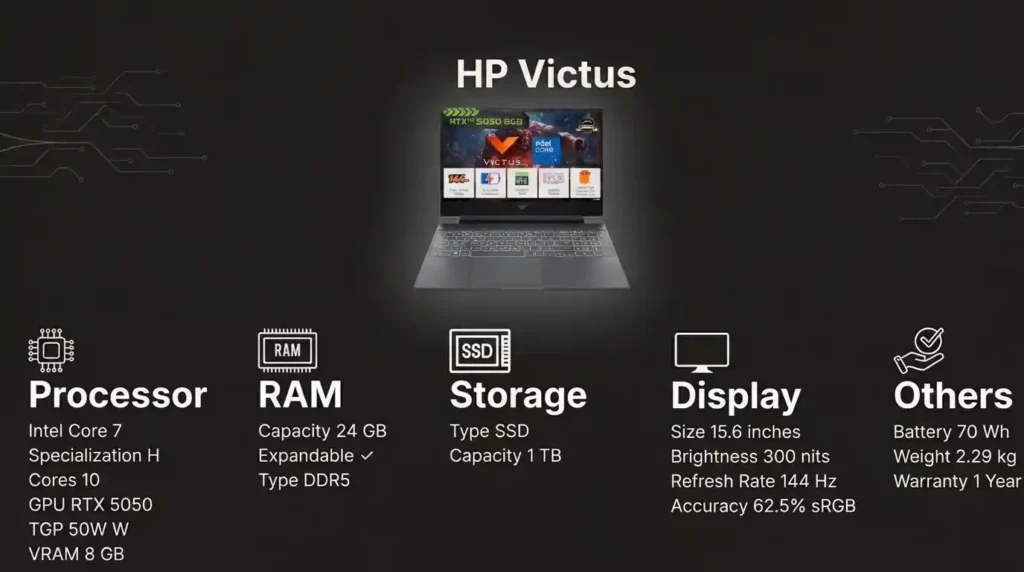
This version of the Victus is a meaningful jump from the cheaper one. It packs an Intel Core 7 processor, 24GB DDR5 RAM, 1TB SSD, RTX 5050 with 8GB VRAM, and a 144Hz Full HD display.
Pros:
- Good RAM and storage configuration
- RTX 5050 makes it capable for gaming and editing
- More future-ready than budget variants
Cons:
- TGP tuning is not great, so GPU performance can be limited
- Display is not ideal for creative professionals without an external monitor
Best for: Gamers who want a better overall spec sheet and can live with some GPU power being left on the table.
Balanced Choices for Gaming and Professional Work
These are the more balanced picks for people who want one machine that can game properly and also handle editing, design work, or AutoCAD without needing an external display right away.
4. HP Omen
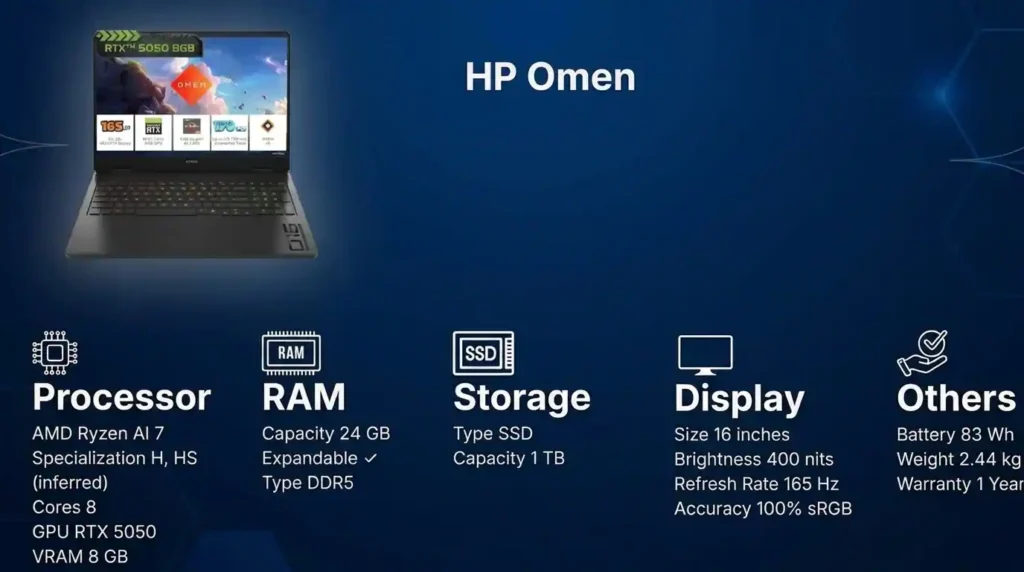
The HP Omen is one of the strongest mixed-use choices in this bracket. The AMD Ryzen AI 7 version is the more affordable one, with an Intel Core i7 option available higher up. It pairs 24GB DDR5 RAM, a 1TB SSD, and an RTX 5050 8GB GPU with a display covering 100% sRGB.
Why it works so well:
- Balanced gaming and creative performance
- Color-accurate display suitable for editing and design
- Enough RAM and storage for real work
Performance expectation:
- Most games at 2K medium settings
- Or 1080p high settings comfortably
Best for: Buyers who need one laptop for gaming plus photo, video, design, or architectural work.
5. Lenovo LOQ
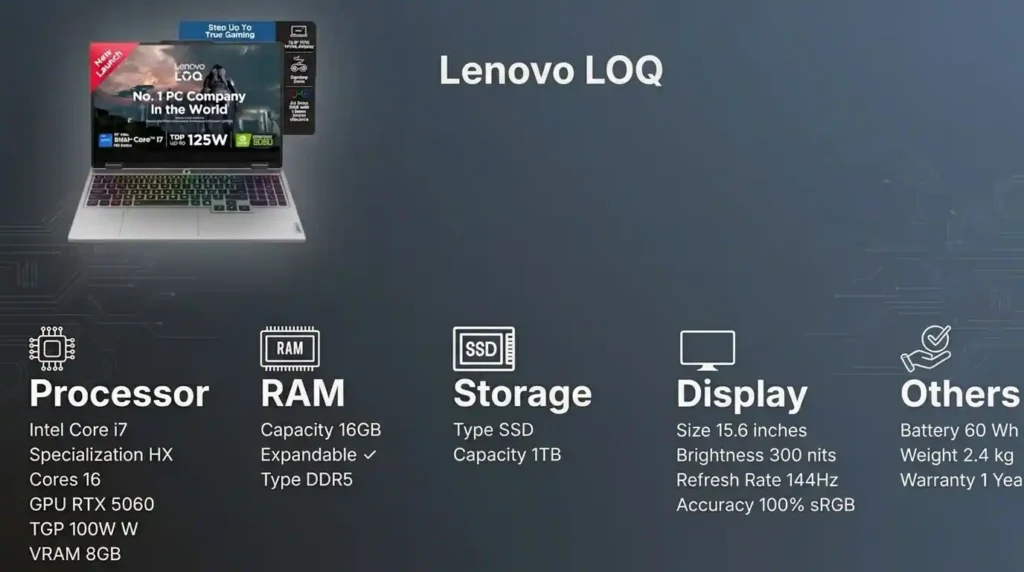
The Lenovo LOQ has become a favorite for good reason. The big headline here is the RTX 5060 8GB GPU, which is clearly faster than the RTX 5050 options. At 100W TGP, it also pushes stronger graphics performance than many rivals in this segment.
Strengths:
- Excellent GPU performance for the price
- Higher frame rates in games
- Faster rendering in GPU-heavy creative tasks
- RAM can be upgraded up to 32GB
Main compromise:
- Only 16GB RAM at a price point where some rivals offer 24GB
Best for: People who prioritize GPU power first and are happy to upgrade RAM later.
6. HP Omen 15
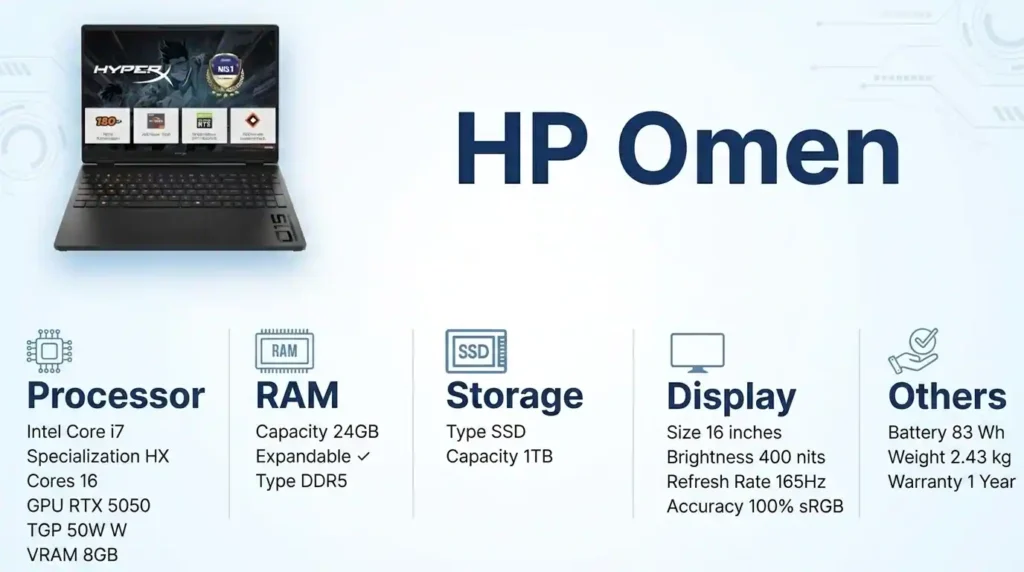
Under roughly one and a half lakh, this is one of the last serious gaming laptops before the premium jump. It comes with a high-performance Intel Core i7 HX-class processor, 24GB DDR5 RAM, 1TB SSD, and a 2K 165Hz display with 400 nits brightness and 3ms response time.
What makes it interesting:
- Very strong processor
- Fast and sharp display for gaming
- Capable for mixed CPU and GPU workloads
The catch:
The CPU is stronger than the GPU pairing really demands, because it still uses an RTX 5050. In many games, the GPU becomes the limiting factor, so those extra CPU resources are not fully used.
What that means in practice:
- For pure gaming, a Lenovo LOQ with RTX 5060 may outperform it
- For workflows mixing processing and graphics loads, such as rendering, simulation, data-heavy work, and gaming, the stronger CPU can still pay off
Best for: Users doing both CPU-intensive work and gaming, not just gaming alone.
Premium Choices for Competitive Gaming and Advanced Editing
Once you move into serious AAA gaming, competitive play, advanced editing, and heavier production work, the budget jumps sharply. At this point, you should be looking at laptops above two lakhs, and you should only do that if portability truly matters. Otherwise, a desktop workstation starts making a lot of sense.
Recommended Hardware Baseline
- Top-tier HX-class processor
- 32GB or more RAM
- 1TB storage minimum
- RTX 5060 or better
- At least 8GB VRAM
- High TGP GPU implementation
7. Lenovo Legion 7
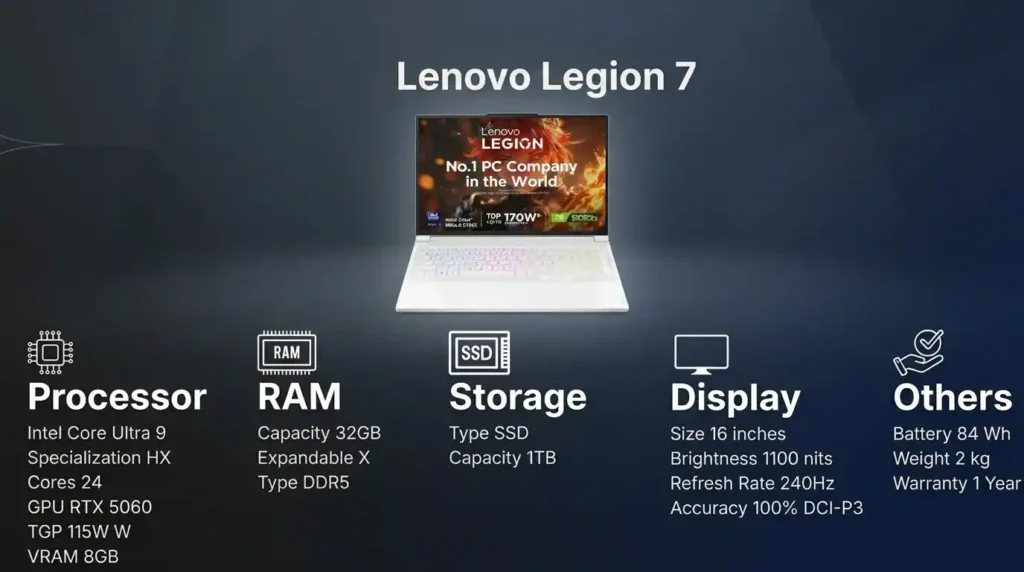
This is a very strong premium all-rounder. It combines an OLED display with a 240Hz refresh rate, an RTX 5060 8GB GPU running at a powerful 115W TGP, and an Intel Core Ultra 9 HX-class processor with 24 cores.
Why it is compelling:
- Excellent 2K high-settings gaming for most titles
- Powerful CPU for advanced creative work
- 100% sRGB display makes it suitable for editors, designers, and architects
- Strong balance between visual quality and performance
Best for: People who want a premium laptop that is equally at home in games and professional creative workloads.
8. Lenovo Legion Pro 5
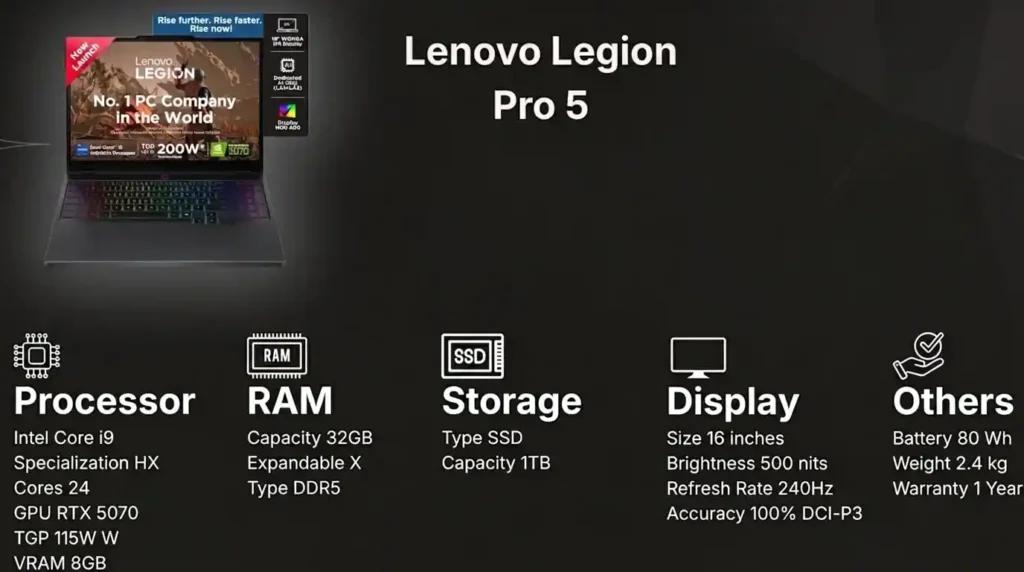
For only a small premium over the Legion 7, this one steps up to an RTX 5070 GPU. That gives it better graphics performance than the RTX 5060-based Legion 7.
Advantages:
- Stronger GPU performance
- Better fit for people who value raw gaming output
Trade-off:
- IPS panel instead of OLED
- Lower brightness than the Legion 7
- Not as strong for HDR impact or bright-room visibility
Best for: Buyers who care more about GPU performance than display sophistication.
9. ASUS ROG Strix G16
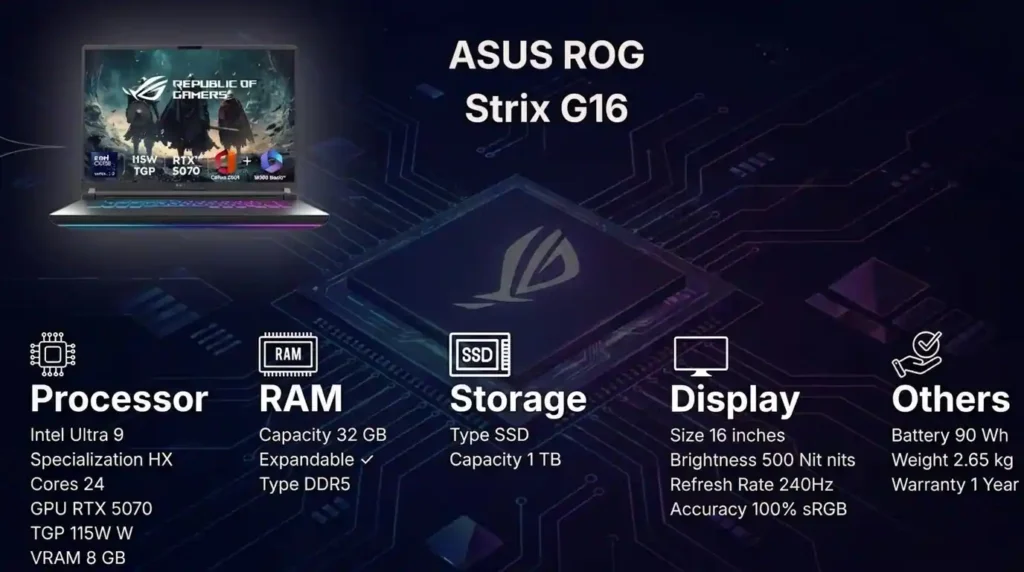
This is another premium pick with very strong raw hardware. Compared with the Legion 7, the main attraction is the RTX 5070 GPU, which brings roughly a 20 to 30 percent performance bump over the RTX 5060 class.
Why that matters:
- Better future-proofing
- Entry-level 4K gaming possibility
- More breathing room for future game releases
Display highlights:
- 240Hz IPS panel
- 100% sRGB and DCI-P3 coverage
- Suitable for both gaming and creative work
Best for: Buyers wanting a stronger graphics-first premium machine without sacrificing creative usability.
10. Alienware 16 Area-51
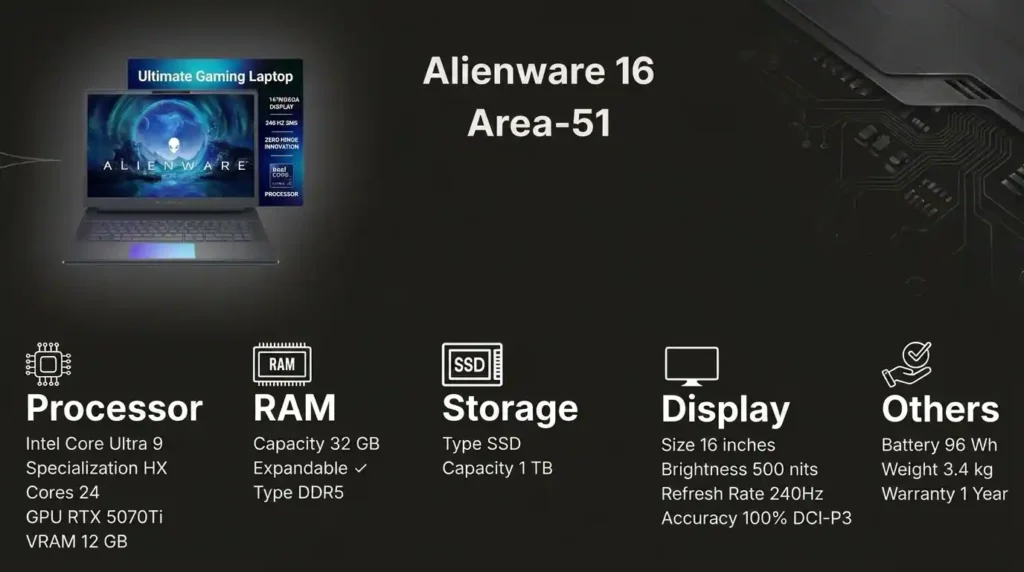
This is the most powerful and most expensive gaming laptop in the group. It comes with an RTX 5070 Ti and 12GB GDDR7 VRAM, putting it in a different league from the rest.
Performance expectations:
- 2K gaming at ultra settings across most titles
- 4K gaming at high settings in many titles
- Excellent long-term headroom for future game generations
Who it is really for:
- Serious gamers
- Professional streamers
- Buyers who want the strongest laptop gaming performance and are willing to pay for it
Who should skip it: Anyone who is budget-sensitive or does not need top-tier portable gaming power.
The Best MacBook for Creative Professionals
Apple MacBook Pro M5 or M5 Pro
If you are deep in the Apple ecosystem and your main use case is creative work, the MacBook Pro is the obvious choice here. With 24GB unified memory, it is well suited for 4K editing, large Xcode builds, and data-heavy workflows without constantly falling back to disk memory.
What makes it stand out:
- Excellent sustained performance
- Active cooling on the Pro model avoids the load-related slowdowns seen on lighter machines
- Outstanding display quality
The Liquid Retina XDR panel is among the best laptop displays available for color accuracy, brightness, and contrast. For editors and designers, that matters every single day.
But for gaming?
Gaming support on Mac has improved, and compatibility tools do help with some Windows titles, but if gaming is a major use case, a Windows laptop or desktop still makes more sense. If gaming is only occasional and creative work is the real priority, the MacBook Pro remains a great option.
Quick Buying Recommendations by Use Case
Best Choice for Tight Budgets: Acer Nitro V15
Best Choice for Gaming and Editing: HP Omen is one of the most complete all-rounders thanks to its better display and balanced spec sheet.
Best Value for GPU Performance: Lenovo LOQ is the smarter choice if frame rates and rendering speed matter more than getting 24GB RAM out of the box.
Best Choice for CPU-Intensive Work: HP Omen 15 suits users combining gaming with demanding CPU work.
Best Premium All-Rounder: Lenovo Legion 7 is excellent for both advanced gaming and creative work.
Best Premium Gaming Upgrade: Lenovo Legion Pro 5 gives you the RTX 5070 step-up for only a little more.
Best MacBook for Creative Work: MacBook Pro M5 or M5 Pro is the right answer for Apple-based creative professionals.
These laptops are ideal for students, professionals, and everyday users, but they are not designed for demanding workloads such as AAA gaming, 4K video editing, 3D rendering, AutoCAD projects, or advanced creative applications. If those tasks are part of your workflow, explore our guide to gaming, editing, and AutoCAD laptops for more powerful performance-focused recommendations.
Final Verdict
The right laptop is not the one with the highest spec sheet. It is the one that matches your actual workload for the next few years without forcing you into an early replacement.
If gaming or creative work is your main focus, do not cut corners on CPU, RAM, GPU, or cooling. If you are a creative professional, display quality also moves into the non-negotiable category. If you are a gamer first, prioritize the GPU, refresh rate, and thermal design.
And if portability is not truly essential, always compare these prices against a desktop before buying. In this segment, that one decision can change the value equation completely.
Pricing, Affiliate, and Sponsorship Disclosure:
All prices are subject to change and may be higher or lower than prevailing market prices. We make no guarantees regarding price accuracy. This content may include affiliate links and/or sponsored placements, through which we may receive compensation. Such compensation does not impact pricing or product representation. Consumers are responsible for verifying final prices with the retailer. 😊 Check: Affiliate Disclosure Page. and check out another social media account: Click Here.