
Buying a Budget Laptop? Avoid These Costly Mistakes First
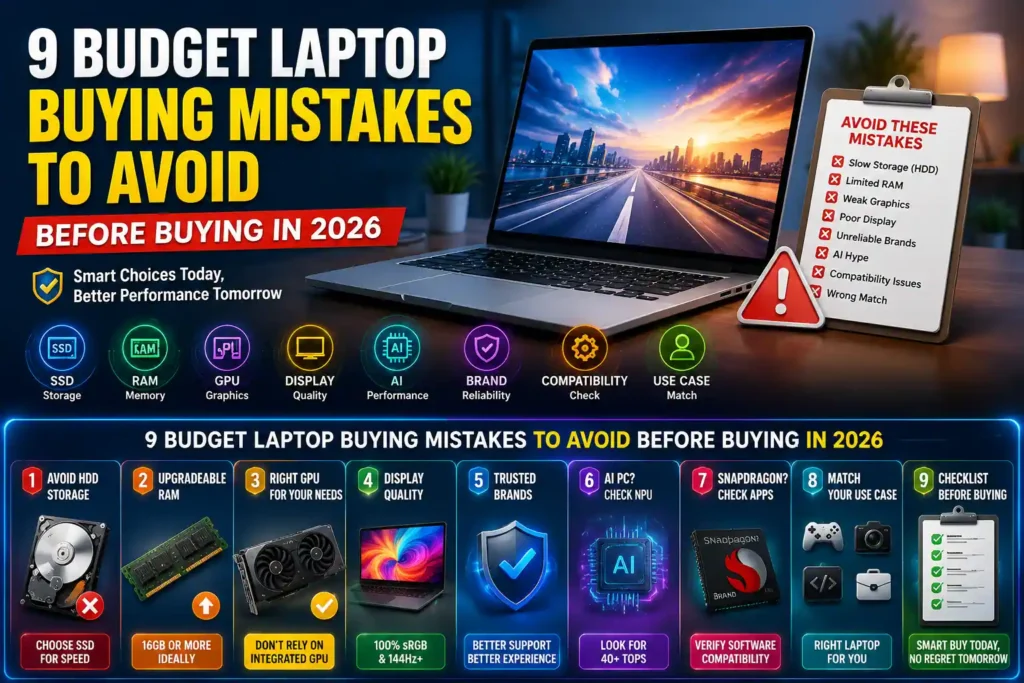
Buying a budget laptop? Learn the 9 most common mistakes to avoid in 2026, including HDD vs SSD, RAM, display quality, AI PCs, Snapdragon compatibility, and GPU selection to choose a laptop that lasts.
Buying a budget laptop is not just about finding the lowest price. It is about avoiding the kind of specs and shortcuts that make a machine feel outdated far too soon.
A lot of laptops look decent on paper, especially in the budget segment. But once you start using them for work, study, gaming, editing, or development, the weak points show up fast. Slow storage, limited RAM, poor displays, weak graphics, and bad software compatibility can turn a cheap purchase into an expensive regret.
If you want a laptop that actually lasts and stays usable in 2026 and beyond, these are the mistakes to avoid.
Avoid Budget Laptop Models That Still Use HDD Storage
If a laptop still comes with an HDD as its primary storage, skip it.
Hard disk drives are simply too slow for a modern laptop experience. Boot times are sluggish, apps take longer to open, file transfers drag, and the whole system feels less responsive. Even basic everyday use can become frustrating.
This is especially important in budget laptops, where older parts are still common. A machine may look affordable, but if it relies on an HDD, that low price often comes with a major performance penalty.
What to do instead: look for an SSD-based laptop. Even an entry-level SSD will feel dramatically faster than an HDD for normal use.
Choose a Budget Laptop with Upgradeable RAM
8GB of RAM by itself is already starting to feel tight for many people. But the bigger problem is buying 8GB in a laptop that gives you no way to expand it later.
That is where trouble begins. As software gets heavier and multitasking becomes more demanding, the laptop can slow down quickly. A few browser tabs, background apps, office work, video calls, and basic editing can already push a system like this harder than it should be pushed.
If the RAM is fixed and there is no expansion path, you are stuck with that limitation for the life of the laptop.
What to do instead:
- Choose a laptop with more than 8GB RAM if possible.
- If you do buy 8GB, make sure there is a RAM expansion option.
- Think ahead, not just for today, but for how you will use the machine over the next few years.
Match Your Budget Laptop GPU to Your Workload
Integrated GPUs are fine for light tasks. But they are not the right choice for everyone.
If your usage includes creative work, gaming, or development workloads on the more demanding side, a laptop with only integrated graphics can become a limiting factor. That includes tasks like:
- Video editing
- 3D work
- Graphic design with heavier workloads
- AAA gaming
- More demanding development use cases
For these kinds of users, integrated graphics may not deliver the performance needed for a smooth experience. The system may run, but not at the level you actually want.
What to do instead: match the GPU to your workload. If your laptop is meant for serious gaming, creative tasks, or advanced development, do not assume integrated graphics will be enough just because the processor is new.
Don’t Overlook Display Quality on a Budget Laptop
The display is one of the most overlooked parts of a laptop purchase, and that is a mistake.
If you do creative work, avoid laptops with less than 100 percent sRGB coverage. Color matters. A weak display can make editing photos, videos, and design work frustrating and inaccurate.
If you are buying a laptop for AAA gaming, avoid displays with refresh rates below 144Hz. A lower refresh rate may still work, but it will not deliver the smoother experience many gamers expect from a modern gaming laptop.
A simple way to think about it:
- Creative work: prioritize 100 percent sRGB.
- AAA gaming: prioritize at least 144Hz refresh rate.
Specs like processor and RAM get most of the attention, but the screen is what you use every single time you open the laptop. It deserves just as much scrutiny.
Pick a Budget Laptop Brand with Reliable Support
Not every brand that sells electronics is equally reliable when it comes to laptops.
Some lesser-known or less established laptop brands may appear attractive because of aggressive pricing or flashy spec sheets. On the surface, they may seem like good value. But long-term experience often depends on more than raw specs.
The concerns usually come down to two things:
- Performance consistency under real use
- Service and support when something goes wrong
A laptop is not just a one-time hardware purchase. It is also about build quality, thermals, reliability, after-sales support, and parts availability. Better-known laptop brands generally have an edge here.
What to do instead: prefer brands with a stronger laptop track record, especially if you want fewer headaches over time.
Understand AI Features Before Buying a Budget Laptop
AI is the latest badge being attached to laptops, but the label alone does not mean much.
If you are specifically shopping for an AI PC, do not stop at the marketing. Check the NPU capability. A useful baseline mentioned here is 40+ TOPS.
Without that kind of hardware capability, the AI branding can be more hype than substance.
What to do instead: evaluate the actual AI hardware, not the sticker on the box. If AI features matter to you, look at whether the laptop truly has the NPU performance to support them in a meaningful way.
Check Software Compatibility Before Buying a Snapdragon Budget Laptop
Snapdragon laptops can be interesting, but they should never be bought blindly.
The key issue is app compatibility. Before buying one, check whether the exact software you rely on works properly on that platform. This matters even more if your workflow depends on specific professional tools, development environments, or specialized applications.
Compatibility problems are easy to underestimate until you run into one. A laptop can have good battery life or modern branding, but if your essential apps do not run well, the experience breaks down quickly.
There is also a clear warning here for more advanced use cases. For higher-demand levels such as creative work, gaming, and development, Snapdragon laptops are not the safe default choice.
What to do instead:
- Check every mission-critical app before buying.
- Do not assume compatibility just because a laptop is new.
- For demanding creative, gaming, or development use, be extra cautious.
Choose the Right Budget Laptop for Your Needs
Most bad laptop purchases happen because people either buy too little machine for their needs or pay extra for features they will never use.
The smarter approach is to right-size the laptop. That means choosing the right balance of storage, RAM, GPU, display, and platform based on what you actually plan to do with it.
Before buying, ask yourself:
- Is this laptop mainly for basic daily use?
- Will it be used for content creation?
- Is gaming a serious priority?
- Do I need it for development or specialized software?
- Can I upgrade RAM or storage later?
- Am I paying for features I will not use?
That one step can save you from both overspending and underbuying.
Budget Laptop Buying Checklist for 2026
If you want a simple filter for budget laptop shopping in 2026, use this checklist:
- Do not buy a laptop with an HDD as the main storage.
- Do not settle for 8GB RAM without upgradeability.
- Do not depend on integrated graphics for demanding creative work, gaming, or development.
- Do not ignore display specs like 100 percent sRGB and 144Hz where relevant.
- Do not assume every electronics brand offers the same laptop quality and service.
- Do not trust AI PC branding without checking for 40+ TOPS NPU performance.
- Do not buy a Snapdragon laptop without verifying software compatibility.
Budget matters, but the wrong compromises cost more in the long run. A laptop that feels slow, limited, or incompatible within a short time is not really a bargain.
A good budget laptop is not just cheap. It is balanced, practical, and capable enough to keep up with how you actually work.
Pricing, Affiliate, and Sponsorship Disclosure:
All prices are subject to change and may be higher or lower than prevailing market prices. We make no guarantees regarding price accuracy. This content may include affiliate links and/or sponsored placements, through which we may receive compensation. Such compensation does not impact pricing or product representation. Consumers are responsible for verifying final prices with the retailer. 😊 Check: Affiliate Disclosure Page. and check out another social media account: Click Here.
Great content! Keep up the good work!
Thank you for your kind words! I’m happy you found the guide useful. Stay tuned for more in-depth buying guides and honest product recommendations.