
Best Printers 2026: Ink Tank vs Laser Printers | Epson vs HP vs Canon vs Brother
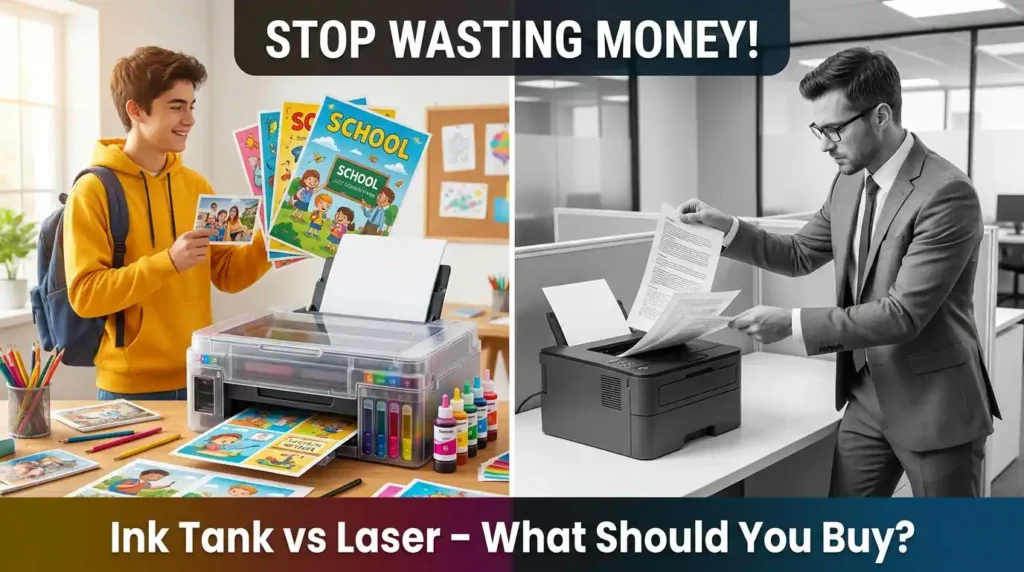
Searching for the Best Printers 2026? Read our expert buying guide comparing Ink Tank vs Laser printers, featuring top picks from Brother, Epson, HP, and Canon to perfectly match your home or office needs.
Buying a printer gets confusing very quickly because brands love to throw around features, model numbers, and marketing names that hide the actual differences. The right way to choose a printer is much simpler: start with how you actually print.
Do you print every day or only a few times a month? Do you need color often, or is it mostly black-and-white documents? Do you need scanning and copying? Do you print from a phone and laptop, or only from one desktop?
Once those answers are clear, the decision becomes straightforward. For most frequent home and school use, an ink tank printer makes the most sense. For occasional document printing with minimal maintenance, a laser printer is usually the better choice.
Ink Tank vs Laser Printer: Which Type Should You Buy?
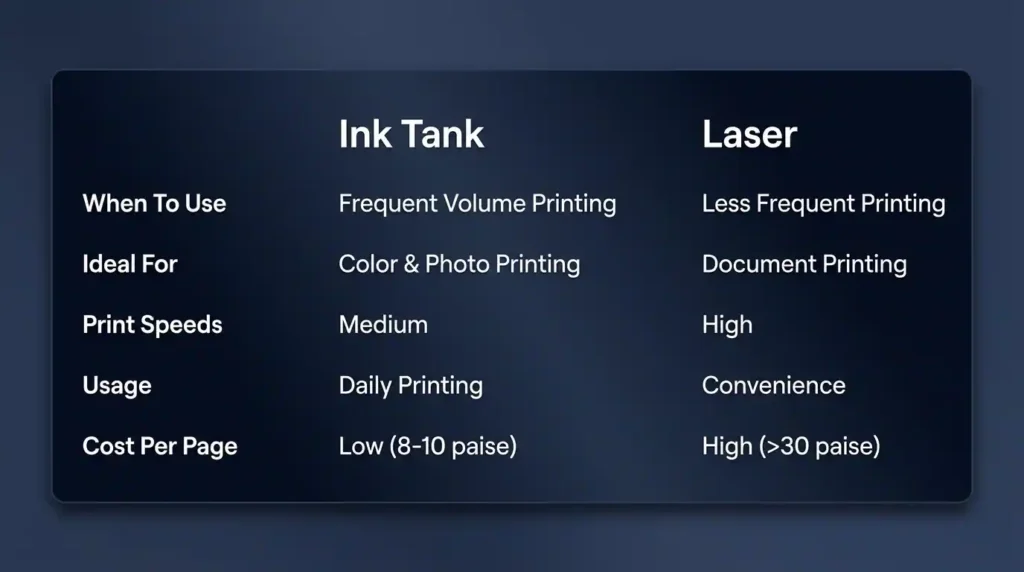
Choose an ink tank printer if:
- You print daily or a few times a week
- You print in larger volumes
- You need color prints regularly
- You want lower running cost
- You may also print photos
Ink tank printers are ideal for schoolwork, home office work, and small businesses that print a lot. Their biggest advantage is cost per page. Typical printing cost is roughly:
- Black and white: around 8 to 10 paise per page
- Color: around 10 to 20 paise per page
Choose a laser printer if:
- You print only a few times a month or even less
- You mostly print documents
- You want sharp text and fast printing
- You want a hassle-free, low-maintenance printer
- You rarely need color
Laser printers use dry toner, so they can sit unused for months and still work fine. That makes them excellent for occasional home printing, especially for things like PAN card copies, Aadhaar printouts, forms, and general paperwork.
The tradeoff is higher running cost. Laser printing cost is generally ₹1 or more per page, which is much higher than ink tank printers.
Why the Avoid Cartridge-Style Inkjets Printers
This is one mistake that is absolutely worth avoiding.
You may see lower upfront pricing on cartridge-style inkjet printers, but replacement cartridges are expensive and they dry up much faster. In practical use, they usually end up being poor value.
Brands also make this more confusing by using different naming conventions. For example, models sold under names like HP Ink Advantage or Canon Ink Efficient may sound attractive, but these are still cartridge-style inkjet printers. If your goal is economical printing, skip them.
Technically, ink tank printers are also inkjet printers, but they use refillable tanks instead of disposable cartridges, and that changes the economics completely.
How to Evaluate Printers in the Ink Tank Category
If you print at least a few times a month, an ink tank printer should be your default choice. The key is choosing the right one for your usage.
1. Single-Function vs Multifunction Ink Tanks Printers
First decide whether you only need printing, or you also need copying and scanning.
- Single-function printer: only prints
- Multifunction printer: print, scan, and copy
In ink tank printers, the price gap between single-function and multifunction models is usually not very large. Because of that, a multifunction model is generally the better buy for most people.
2. Monochrome vs Color Output
If your main use is document printing, a monochrome printer is enough. These are optimized for black-and-white output, often print faster, and avoid the need to replace color consumables that you hardly use.
That said, in the ink tank category, monochrome choices are limited. Most people still end up buying color ink tank printers because they offer more flexibility.
3. Essential Wireless and Wi-Fi Direct Featuresal
If you mostly print from a mobile phone or laptop, buy a printer with Wi-Fi. It makes day-to-day use far more convenient and helps future-proof your purchase.
Also pay attention to Wi-Fi Direct. Not every Wi-Fi printer supports it. Wi-Fi Direct allows the printer to act like its own hotspot, so you can connect directly without needing an active home Wi-Fi network.
4. Understanding Print Speeds (PPM vs IPM)
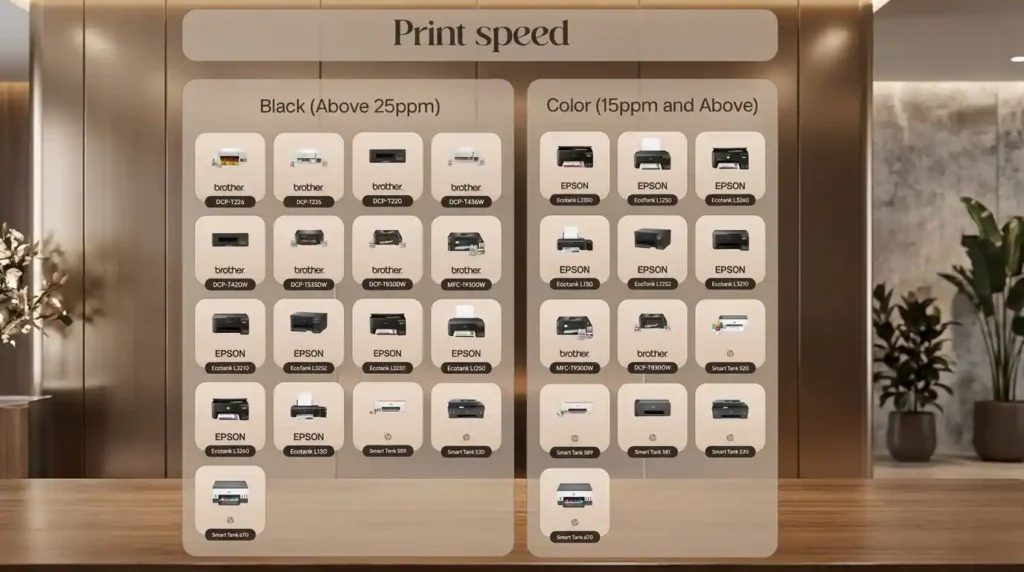
Print speed matters most if you print in batches. If you print only a few pages now and then, it is less critical.
Brands usually publish either:
- PPM or pages per minute
- IPM or images per minute
IPM is generally a better measure because it includes text and graphics, but not all brands publish it consistently.
Across the market, Brother and Epson generally have the fastest print speeds among ink tank printers, while Canon and HP tend to be slower. Color and photo printing are naturally slower than monochrome printing.
Ink tank printers focused mainly on document printing can reach speeds of up to around 39 pages per minute.
5. Calculating Per-Page Print Cost
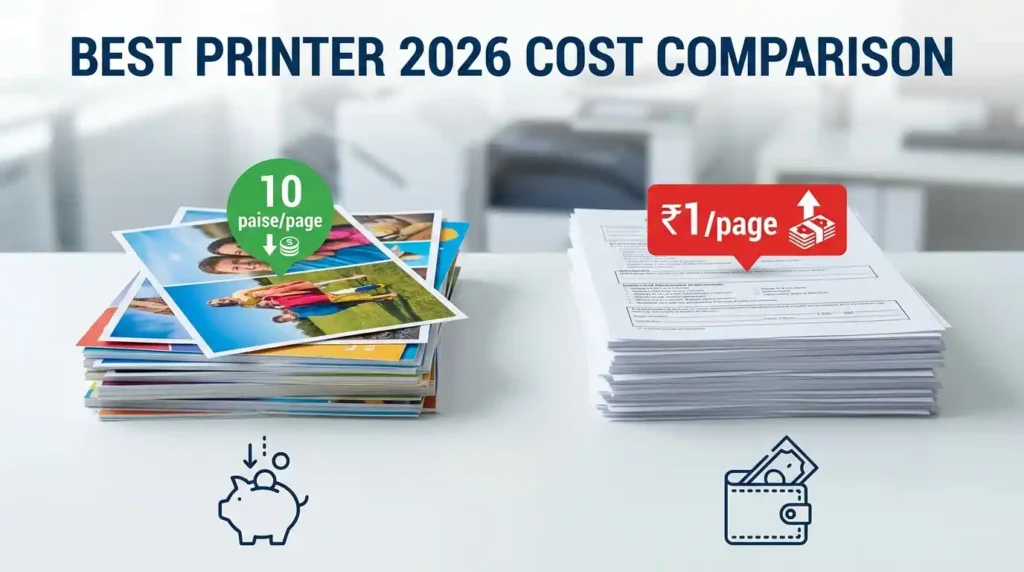
Based on per-page cost, HP has the highest printing cost among the major ink tank brands. Brother, Epson, and Canon are more comparable.
- Brother does better on monochrome running cost
- Epson does better on color print cost
So if you print mostly documents, Brother has an edge. If color printing matters more, Epson becomes especially attractive.
6. Print Quality and Resolution Limits
Resolution matters differently depending on what you print.
- Document printing: 600 x 600 is sufficient
- Regular color prints: around 1200 x 1200 is good enough
- Photo printing: around 1200 x nearly 3000 is good, while 1440 x 2880 is ideal
For photos, Epson stands out. If photo printing is one of your main use cases, Epson is one of the strongest choices in this category.
7. Paper Size and Media Thickness Support
Most home ink tank printers support A4. A few support A3, but those are more expensive and feel closer to commercial variants.
Paper thickness support is also worth checking:
- 220 GSM is common and enough for most home use
- Some HP and Brother models support up to 300 GSM
For reference, photo paper used in ink tank printers is typically around 200 GSM.
8. Auto Duplex and Auto Document Feeder (ADF)
These features usually appear in mid-range and higher-end printers:
- Auto duplex: automatic double-sided printing
- ADF or Auto Document Feeder: automatically feeds multiple sheets for scanning
Entry-level models usually do not include these. If you print lots of documents, auto duplex is very useful. If you scan many pages at once, ADF becomes essential.
9. Long-Term Warranty and Brand Service Networks
Most printers in this category offer a warranty of 1 year or 30,000 pages, whichever comes first.
In service network terms:
- HP and Epson have strong pan-India service coverage
- Brother gets praised for product durability and reliability
- Brother’s service network is relatively sparse compared to HP and Epson
Spare parts and refill inks are generally available online for all major brands.
Top-Rated Ink Tank Models Among the Best Printers 2026
For most people, Wi-Fi printing should be a must-have. Auto duplex is not mandatory for everyone, but it is a very nice feature if you print lots of documents.
Best value ink tank printer: Brother DCP-T535DW
This is one of the easiest all-round recommendations for students, home offices, and small businesses that print regularly.
Why it stands out:
- Wi-Fi printing support
- Auto duplex for automatic two-sided printing
- Supports Wi-Fi Direct and Apple AirPrint
- Comes with an extra black ink bottle
- Monochrome page yield goes up to 15,000 pages before replacement
If your work involves large batches of document printing, this is a very practical choice. The main weakness is photo output. Photo prints are not as good as Canon or Epson.
Best for: frequent document printing, students, home office use
Not ideal for: people whose main priority is photo printing
Best for photo-friendly everyday use: Epson EcoTank L3252
If you want an ink tank printer with slightly faster print speed than the recommended Brother model and better photo performance, the Epson EcoTank L3252 is a strong pick.
Pros:
- Good print speed
- Better photo printing than the comparable Brother option
- Supports Wi-Fi and Wi-Fi Direct
- Works well with phones, tablets, and laptops once configured properly
Cons:
- No auto duplex
- Wi-Fi setup can be confusing for first-time users
One small thing that causes unnecessary confusion: Epson sells variants like L3255 and similar model numbers. These are effectively the same in capabilities and are often just labeled differently for different sales channels.
Best compact Brother alternative: Brother DCP-T436W
At a price close to the Epson option, and sometimes slightly lower, the Brother DCP-T436W is another excellent value ink tank printer.
Highlights:
- Wi-Fi printing with Wi-Fi Direct
- No auto duplex or ADF
- Enclosed 150-sheet paper tray
- Compact design
- Better protection from dust and humidity than rear-feed designs
- Fast printing at around 27 ppm black and 11 ppm color
Again, like the other Brother models here, photo printing is not its strongest area. Canon and Epson do better if photo output matters more.
Best heavy-duty ink tank printer for printing and scanning: Brother DCP-T830DW
If you need to print a lot and also scan many pages in one go, this is where stepping up to a more capable model makes sense.
Why this one is worth considering:
- ADF support for automatic scanning of up to 20 sheets
- Wi-Fi printing
- Auto duplex
- Multipurpose tray for thicker media
- Supports card stock, envelopes, and photo paper up to 220 GSM
- Comes with an extra black bottle for up to 15,000 monochrome pages
This is a very good fit for small offices and heavy home-office use where manual scanning starts becoming annoying very quickly.
Best budget ink tank printers
On a budget, the main compromise is usually Wi-Fi printing. If Wi-Fi is non-negotiable, it is worth spending a little more on the earlier recommendations.
HP Smart Tank 520
- Good budget option with up to 12,000 monochrome pages
- Includes an extra black ink bottle
- User-replaceable print head, which is useful if it gets clogged
- Control panel is more intuitive than many rivals
This is one of HP’s more practical strengths in entry-level ink tank printers. Being able to replace the print head yourself is a nice ownership advantage.
Canon MegaTank G2012
- Also includes an extra ink bottle
- Up to 12,000 monochrome pages
- Good high-resolution photo printing capability
Main drawbacks:
- Slower print speed
- Higher print cost than some competitors
Brother DCP-T236
- Good budget page yield: 7,500 black and 5,000 color
- Low per-page printing cost
- 150-sheet enclosed paper tray
- No Wi-Fi, no auto duplex, no ADF
This is ideal for students and home users who want a budget-friendly high-volume printer and do not care about wireless printing.
How to Evaluate the Laser Category Printers in 2026
Laser printers are ideal when printing is infrequent and mostly document-focused. They are especially good if you want a printer that can sit for weeks or months and still be ready when needed.
1. The Value of Single-Function Laser Models
Unlike ink tank printers, the price gap between single-function and multifunction laser printers is much larger. So if you do not need scanning or copying regularly, a single-function laser printer is the value pick.
Also, many people can comfortably scan documents using phone apps such as Adobe Scan, Google Drive’s built-in scan tools on Android, or the Notes app on iPhone. That makes a print-only laser printer more practical than it used to be.
2. Why Monochrome is the Standard for Home Use
Color laser printers are much more expensive, often starting above ₹25,000. For most homes, monochrome laser printers are the sensible default.
3. The Importance of Wi-Fi Connectivity
Budget models may skip Wi-Fi, but in everyday use it is extremely convenient. If you print mostly from phones and laptops, choosing a laser printer with Wi-Fi is worth it.
4. Document Print Quality Standards
Since laser printers are primarily used for document printing, anything above 600 x 600 is already sufficient, and practically all decent laser printers support that.
5. Laser Print Speed and Brand Differences
Brother laser printers generally have the highest print speeds, often close to 50% better than other brands in comparable segments.
If fast document printing is your main priority, Brother has a clear advantage.
6. Running Costs and Toner Cartridge Replacements
Laser printers use toner cartridges, usually rated for up to around 2,000 pages. If you print infrequently, one cartridge can last years.
Replacement toner cartridges typically cost around ₹3,000 to ₹6,000.
Among laser printers, Brother and Pantum generally offer the lowest printing cost per page. HP’s LaserJet Tank series uses refillable toner systems that work a bit like ink tank logic. Brother’s Toner Box technology also improves value by offering lower-priced cartridges with higher yield, reducing printing cost significantly compared to traditional toner cartridge printers.
One issue to keep in mind: original Brother replacement toner cartridges can be harder to find than those for some competing brands.
7. Legal Paper Support and Thickness Handling
Since laser printers are mostly for documents, support for paper thickness under 150 GSM is enough for most users.
- Some Brother models support up to 230 GSM
- Canon and some HP models support up to around 163 GSM
Legal-size paper support is available on Brother, Canon, and higher-end HP and Pantum models. Lower-end versions may not support it. The Pantum BP5100 series also has an A3 option if that specifically matters.
8. Auto Duplex and Scanning Features
Since laser printers are often used for document-heavy work, auto duplex becomes especially useful. Other than budget models, most laser printers include it.
All Brother and Xerox laser printers in this discussion support auto duplex. A few HP, Canon, and Pantum models do not.
If you also scan stacks of documents, then ADF is essential. Only a few multifunction laser printers offer it, and those are usually more expensive.
9. Laser Printer Service and Ownership
Warranty is generally 1 year or 30,000 pages, whichever comes first.
- HP has the best pan-India service network
- Pantum is aggressive on pricing but service is weaker
- Xerox is strong in enterprise service, but consumer support is not as strong
Top-Rated Laser Models Among the Best Printers 2026
Best Single-Function Monochrome Laser Printer: Brother HL-L2440DW
If you want fast, heavy-duty black-and-white printing on a budget, this is one of the best picks.
- Single-function monochrome laser printer
- Auto duplex support
- High print speed of 30 ppm
- Can print a 100-page document in a little over 3 minutes
- Large 250-sheet paper tray
- Great for students and home offices
This is a classic no-nonsense document printer. Fast, practical, and excellent value.
Cheaper alternative: Brother HL-L2321D
If you want to spend less, this is the lower-cost Brother option. It offers broadly similar capability but without Wi-Fi and with a lower print resolution of 600 x 600 dpi.
Best HP single-function laser printer: HP Laser 1008w / 1008a
If you prefer HP, this is the practical entry point.
- Single-function monochrome laser printer
- Manual duplex only
- Print speed around 21 ppm
- 100-page document takes about 5 minutes
The 1008w adds Wi-Fi, while the 1008a is the more basic version. It is not as fast or as capable as the Brother recommendation, but HP’s service network is a strong reason some buyers still prefer it.
Best multifunction laser printer: Brother DCP-L2541DW
If you need print, scan, and copy in one machine, this is a very strong choice for small offices and home-office use.
- Multifunction laser printer
- Auto duplex printing
- ADF for scanning up to 35 sheets
- Fast monochrome print speed of 30 ppm
- Dedicated 2-in-1 ID copy button
That ID copy button is genuinely useful. It lets you copy both sides of an ID card onto a single page quickly, which is great for routine documentation.
Cheaper alternative: Brother DCP-L2605DW
At roughly ₹1,000 less, you can choose the DCP-L2605DW. The tradeoff is that it does not include ADF.
Best HP multifunction laser printer: HP LaserJet M233dw
This is a good pick if you want HP’s ecosystem and serviceability.
- Wi-Fi and Wi-Fi Direct support
- Print from phone, tablet, or laptop
- Fast print speed of 30 ppm
- Auto duplex support
- Heavy-duty monthly duty cycle of 20,000 pages
Main drawback: no ADF
So if you scan many pages at a time, this can become tedious. But if your scanning needs are light, it is still a very capable all-round office printer.
Best colour laser printer: Brother HL-L3230CDW
Color laser printers only make sense for a specific kind of buyer: someone who needs high-speed color document printing and is okay paying more both upfront and over time.
- Ideal for small offices
- High-volume color printing
- Auto duplex support
- Color print speed of around 24 ppm
That speed is much higher than color ink tank printers, which may print color at only around 5 to 8 pages per minute in many cases.
But the running cost is the catch. Toner replacement for color laser printers is expensive. If you are cost-sensitive, a color ink tank printer is usually the smarter buy.
Epson vs HP vs Canon vs Brother: Who Makes the Best Printers 2026?
If you want the quick brand-level takeaway, it is this:
- Brother: excellent value, fast printing, low running cost, durable products
- Epson: very good color cost, strong photo printing, good speed
- Canon: strong photo printing quality, but slower and often costlier to run
- HP: best service reach, intuitive controls, but usually higher print cost
For most value-focused buyers, Brother is hard to ignore. For photo-heavy use, Epson is especially compelling. If service access matters more than anything else, HP remains a safe choice.
Final Recommendations for Buying the Best Printers 2026
If you print regularly, especially in color, buy an ink tank printer. For most people, that should be the starting point.
If you print only occasionally and mostly need clean, sharp document prints with minimal maintenance, buy a laser printer.
If I had to simplify the shortlist:
- Best value ink tank: Brother DCP-T535DW
- Best ink tank for better photo use: Epson EcoTank L3252
- Best heavy-duty ink tank: Brother DCP-T830DW
- Best budget ink tank: HP Smart Tank 520 or Brother DCP-T236 depending on priorities
- Best single-function laser: Brother HL-L2440DW
- Best multifunction laser: Brother DCP-L2541DW
- Best HP multifunction laser: HP LaserJet M233dw
- Best color laser: Brother HL-L3230CDW
The biggest mistake is not choosing the wrong brand. It is choosing the wrong printer type for your usage. Get that right first, and the shortlist becomes much easier.
Pricing, Affiliate, and Sponsorship Disclosure:
All prices are subject to change and may be higher or lower than prevailing market prices. We make no guarantees regarding price accuracy. This content may include affiliate links and/or sponsored placements, through which we may receive compensation. Such compensation does not impact pricing or product representation. Consumers are responsible for verifying final prices with the retailer. 😊 Check: Affiliate Disclosure Page. and check out another social media account: Click Here.