
12 Best Smart Locks in India (2026): Top Picks for Every Budget and Door Type
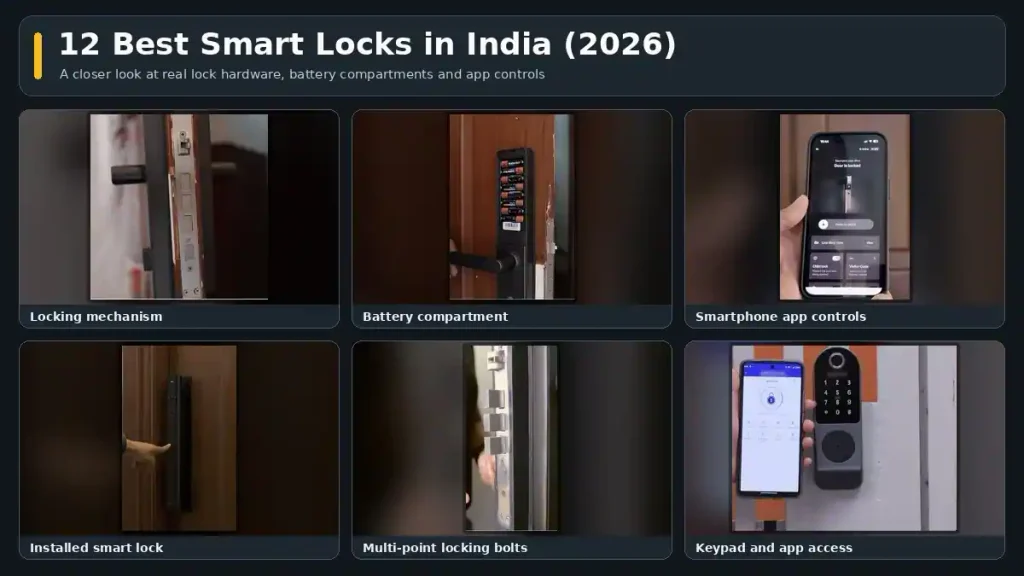
Discover the best smart locks in India for 2026. Compare Yale, Qubo, Atomberg, MyGate, Godrej and Native by features, price, battery life and security.
The best smart lock is not necessarily the one with the longest feature list. Every camera, screen, wireless connection and extra unlocking mode adds to the price, and many of them also put more pressure on the battery.
I compared more than 100 smart locks to shortlist the models worth considering across different needs and budgets. My biggest takeaway is simple: buy for your door and your daily routine, not for features you may never use.
For most homes, the strongest value is in the ₹10,000 to ₹20,000 segment. But a simpler Bluetooth lock can be a better purchase than a premium model if you do not need live video or remote unlocking through an app.
Best Smart Locks in India: Key Takeaways
- Check door material, thickness and installation compatibility before comparing smart features.
- Bluetooth is sufficient for most homes; Wi-Fi adds direct remote unlocking but uses more battery.
- The ₹10,000 to ₹20,000 segment offers the strongest overall value, with models such as Native Lock Pro and MyGate Plus.
- Prioritise bolts, a privacy deadbolt, warranty and local service over extra unlocking modes.
Table of Contents
- How to Choose the Best Smart Locks for Your Home: The SECURE Framework
- Best Value Smart Locks in India (₹10,000–₹20,000)
- Best Premium Smart Locks Above ₹20,000
- Best Budget Smart Locks Under ₹10,000
- Best Rim Smart Locks for Metal Doors
- Which Smart Lock Would I Choose?
How to Choose the Best Smart Locks for Your Home: The SECURE Framework
Before comparing individual models, use these six checks to narrow down what will actually work for you:
- S: Size and fit. Check door material, thickness, configuration and installation requirements.
- E: Energy. Understand battery life, replacement costs and emergency power options.
- C: Connectivity. Decide whether you need Bluetooth, Wi-Fi or neither.
- U: Unlock modes. Pick the access methods you will actually use.
- R: Resistance. Look at bolts, an internal privacy deadbolt and security alerts.
- E: Extended warranty and support. Check installation, repair coverage and service availability in your area.
Size and Fit: Check Door Compatibility Before Buying a Smart Lock
Most smart locks are designed for wooden doors. If you have a metal door, a compatible rim lock is usually the more suitable starting point. Do not assume that a model designed for wood can also be installed on metal.
Door thickness matters just as much. Many smart locks need at least 30 mm, while some require more than 35 mm. A few support thinner doors. The Atomberg Azhero, for example, supports wooden doors as thin as 28 mm.
Also check whether the lock supports a single or double door. Most options available in India are designed for single doors.
If you are replacing an existing lock, factor in the appearance of the door after installation. Old cutouts or exposed areas may need patchwork and paint.
There are three main form factors:
- Locks with handles: The most common type. Handles are generally reversible for left-opening and right-opening doors.
- Handleless and push-pull locks: These offer a different design and operating style, but the lack of a conventional handle does not automatically mean better security.
- Rim locks: These sit on the surface rather than requiring the lock body to be recessed into the door. They generally have fewer bolts and access modes, but can suit interior doors, metal doors and certain glass-door applications.
Battery Life and Power: Understand Smart Lock Battery Requirements
I have three smart locks at home with very different battery demands. One has gone almost three years without a battery change. Another needs fresh batteries roughly every six months. A feature-heavy rechargeable model needs charging every two to three weeks.
That difference is why battery life should be part of the buying decision, not an afterthought.
- Bluetooth-only locks: Usually offer very good battery life because they do not maintain a Wi-Fi connection.
- Wi-Fi locks: Typically need battery replacement around every six to eight months, depending on the model and usage.
- Face recognition and live-video locks: Can need recharging anywhere from about 15 days to three months, depending on how frequently those features are used.
Many locks run on four or eight AA batteries. A set of eight suitable high-performance batteries can cost roughly ₹350 to ₹400, so include that in your running costs.
Premium models increasingly use rechargeable lithium-ion batteries. The Native Lock Ultra includes two 5,000 mAh batteries, allowing you to keep one charged while using the other. That is a useful detail when the lock needs frequent charging.
If the batteries run flat while you are outside, the locks discussed offer emergency access options such as external power from a power bank or a mechanical key. Check the exact arrangement before buying, and make sure your spare key is accessible rather than locked inside.
Connectivity: Bluetooth vs Wi-Fi vs Offline Smart Locks
Bluetooth is enough for most homes unless you specifically need to unlock the door remotely through an app.
With a Bluetooth-only lock, app control works when you are close to the door. Supported models can still let you generate and share an OTP from elsewhere. What you cannot do is tap an app button from another city and directly unlock the door.
Built-in Wi-Fi adds that remote app control, along with features such as real-time alerts and live access logs. The trade-off is higher battery consumption.
A Wi-Fi outage does not stop local entry methods from working. Fingerprints, PINs and other supported on-door methods remain available; internet-dependent features are what you lose temporarily.
Locks without Bluetooth or Wi-Fi are also worth considering. They offer a simpler experience, avoid sending access data through a connected app and can deliver excellent battery life. The compromise is manual setup on the lock itself, without app-based user management or remote access.
Unlocking Methods: Which Smart Lock Features Do You Actually Need?
Fingerprint, PIN, RFID card, OTP, app access and a physical key are common across many smart locks. In practice, most households will rely on just one or two methods.
The more meaningful differences appear in premium features:
- Face unlock: Prefer 3D face recognition over basic 2D systems. The premium 3D implementations are designed to resist photo-based unlocking and work better in dim apartment corridors.
- NFC phone unlocking: Supported models let you tap a compatible phone to unlock. Convenient, but not essential.
- Palm unlocking: A hands-free alternative to touching a fingerprint sensor, available on select models.
Visitor identification is another area where features can sound similar but work differently.
Native’s Doorbell Connect feature works with an existing doorbell without additional doorbell wiring. On the Native Lock Pro, a ring triggers a photo notification. The Native Lock Ultra adds live video and two-way communication.
A separate video doorbell serves a different purpose. It can retain footage of movement for longer, whereas the smart-lock video features discussed here should not be treated as a replacement for recorded security-camera footage.
Security: Compare Locking Bolts, Privacy Deadbolts and Alerts
Budget locks often have one or two bolts, while many models above ₹10,000 have three to five. More bolts distribute force across more points in the frame, making bolt count an important comparison when shortlisting a main-door lock.
I also value a manual internal privacy deadbolt. When engaged, it prevents entry from outside, including through normal electronic access methods such as a fingerprint or PIN. For a front door, this can be more useful than another unlocking mode.
Other worthwhile security features include:
- Scramble PIN: Lets you enter random digits before and after your actual PIN to make it harder for someone nearby to identify the code. This is now common on premium models rather than a major differentiator.
- Tamper alarm: Sounds or sends an alert after repeated incorrect attempts or attempted forced entry, depending on the model.
- Door-position sensor: Tells you whether the door is actually open or shut, rather than only reporting the lock state. Examples include the MyGate Lock Pro 2.0 and Native Lock Ultra.
Warranty, Installation and After-Sales Service for Smart Locks
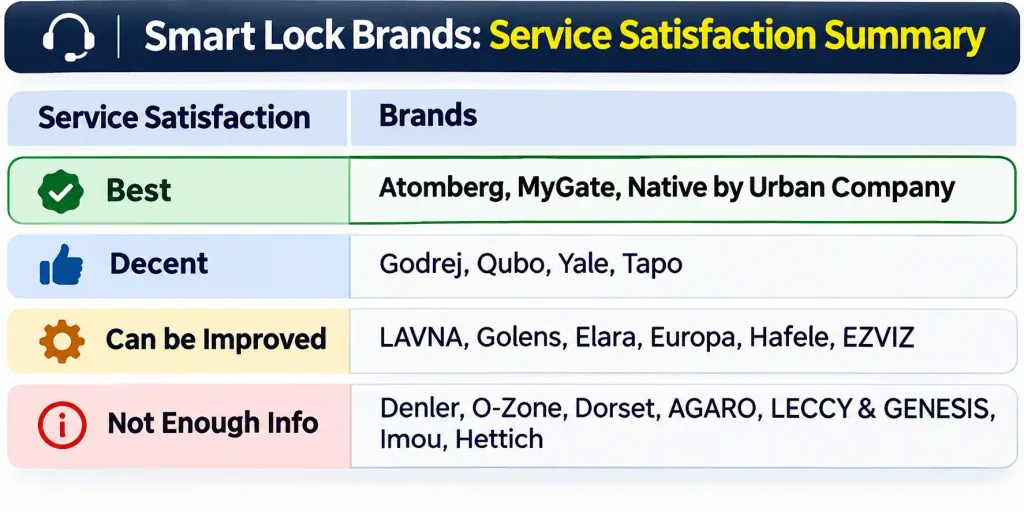
One- or two-year warranties are common, while some models offer three years. A longer warranty matters here because touch panels and fingerprint sensors are among the components that attract long-term failure complaints.
Popular brands including Qubo, Godrej, Atomberg, Urban Company, MyGate and Yale generally include installation where they have coverage. Brands such as LAVNA, Golens and AGARO may charge for installation in many cities. Always confirm the terms for your location before ordering.
In my product and service satisfaction analysis across approximately 24,000 reviews, Atomberg, MyGate and Native by Urban Company stood out. Their negative feedback was more often about installation than lock failure. Godrej and Qubo were reasonably good, although there were some reports of failures after more than two years.
My preference is a reputable brand with an accessible service network. If something goes wrong with your front-door lock, getting it repaired matters more than having one extra feature.
One regulatory point is worth noting: at the time of this comparison, a new BIS standard for electronic locks was not mandatory, and none of the mainstream models compared carried the certification. If it becomes mandatory, certification will become another important selection filter.
Best Value Smart Locks in India (₹10,000–₹20,000)
This is where most of my recommendations sit. You generally get three to five bolts, a stronger security feature set and, on some models, Wi-Fi connectivity.
Native Lock Pro by Urban Company: Best Smart Lock for Main Doors

Note: Price may change anytime. Click above to see the latest Amazon price and offers.
The Native Lock Pro is the lock I use on my main door. Its most useful feature is Doorbell Connect: when someone rings the existing doorbell, you receive a photo in the app and can choose to unlock remotely.
- Seven unlocking methods.
- Four stainless steel bolts and a privacy latch.
- Three-year unconditional warranty covering all parts.
- Doorbell integration without additional doorbell wiring.
The compromises are battery consumption and the app experience. It uses eight high-performance AA batteries, with replacement typically needed every six to eight months depending on use. It also operates through the Urban Company app, which can feel clunky.
Best for: A main door where visitor photos, remote access and a comprehensive warranty matter more than minimising battery changes.
MyGate Smart Door Lock Plus: Best Value Smart Lock Under ₹15,000
Note: Price may change anytime. Click above to see the latest Amazon price and offers.
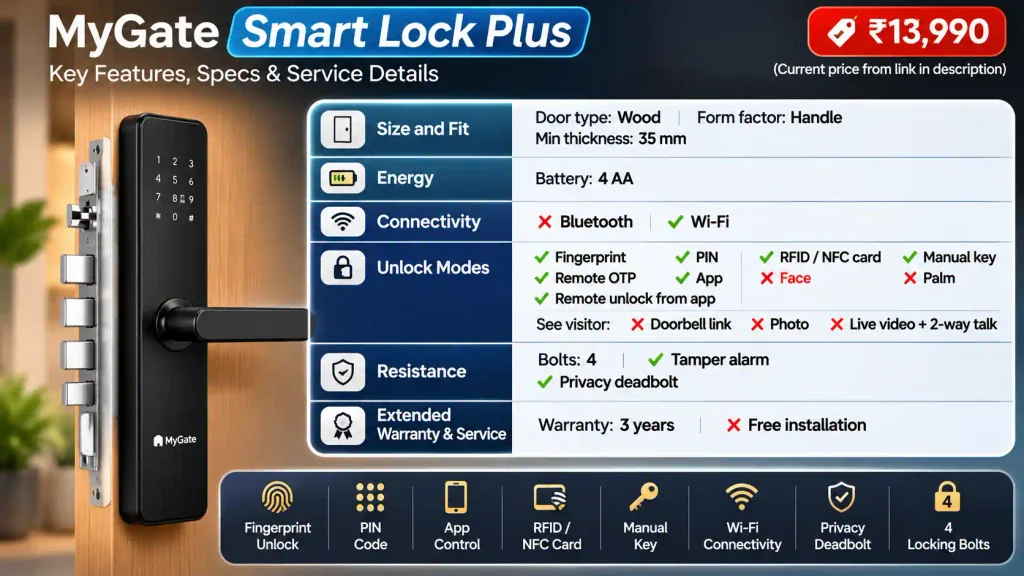
The MyGate Smart Door Lock Plus keeps things practical. You get four bolts plus a deadbolt, along with fingerprint, PIN, app, RFID, OTP and key access.
It is Bluetooth-only, so remote entry is through a passcode rather than an app-based unlock button. There is no Wi-Fi, face recognition or visitor camera.
The support package is a major attraction: a three-year warranty, free installation in covered locations, onsite repairs and ten-year service support.
Best for: Someone who wants a well-rounded lock under ₹15,000 without paying for camera features or constant connectivity.
Qubo Smart Door Lock Ultra: Best Wi-Fi Smart Lock for Qubo Users
Note: Price may change anytime. Click above to see the latest Amazon price and offers.
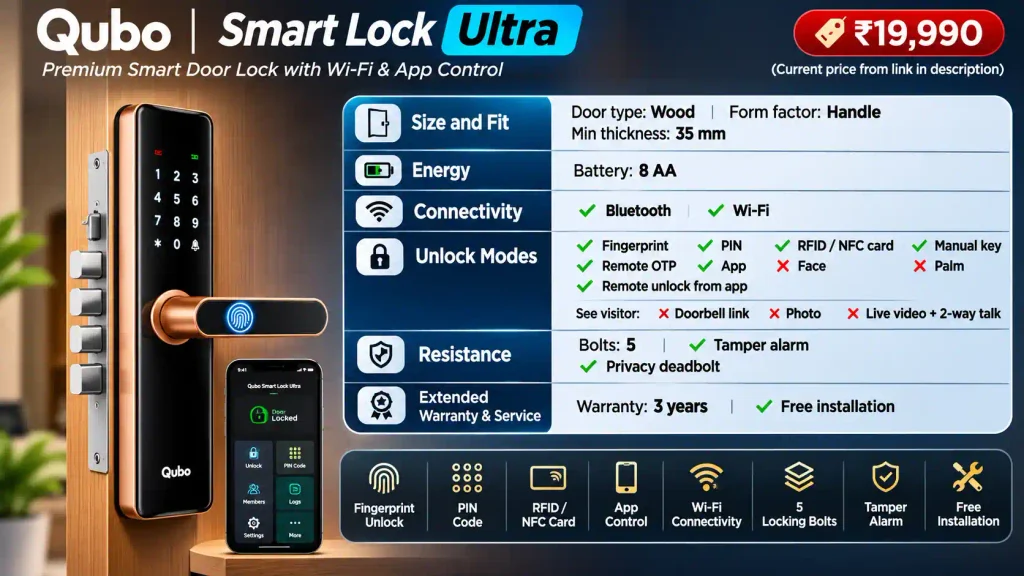
The Qubo Ultra includes built-in Wi-Fi, so you can unlock it through the Qubo app from anywhere. It has five stainless steel bolts, seven unlocking methods and tamper alerts.
You also get a three-year warranty and free installation in many cities. Like the Native Lock Pro, it needs eight AA batteries.
At close to ₹20,000, it feels relatively expensive against competitors offering more features. Still, if you already use Qubo security cameras or dash cams and value its ecosystem and service, it can make sense.
Best for: Existing Qubo customers who want remote app unlocking and prefer staying with the same brand.
Atomberg SL 1: Best Five-Bolt Smart Lock Without Wi-Fi
Note: Price may change anytime. Click above to see the latest Amazon price and offers.
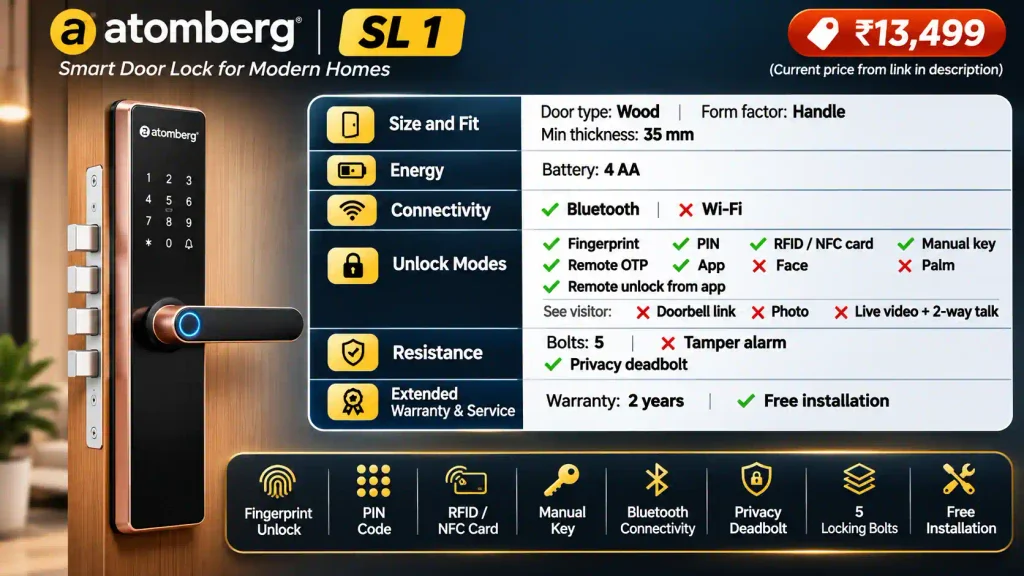
The Atomberg SL 1 is the more security-focused step up from the budget Azhero. It has five stainless steel bolts and a manual privacy deadbolt, along with six standard unlocking modes.
It is Bluetooth-only, so remote access is through a passcode rather than direct app unlocking. Atomberg says the data is stored in India.
The main drawback against the strongest alternatives here is the two-year warranty, compared with three years on Native, MyGate and Qubo recommendations in this segment.
Best for: Someone who values a five-bolt design and internal privacy deadbolt but does not need Wi-Fi or a camera.
Godrej Catus Touch Plus: Best Offline Smart Lock for Keyless Entry
Note: Price may change anytime. Click above to see the latest Amazon price and offers.
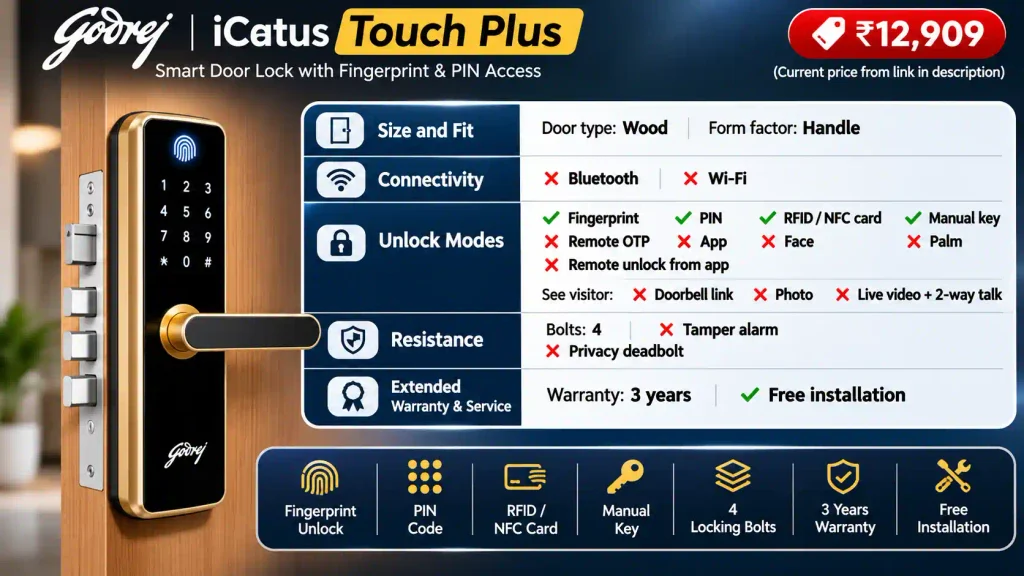
At around ₹13,000, the Godrej Catus Touch Plus offers fingerprint, PIN, RFID and mechanical-key access, with three bolts.
There is no app, Bluetooth or Wi-Fi. For someone who wants their access data to remain on the lock, that simplicity is the attraction.
The limitations are equally clear: users must be configured manually on the lock, there is no app-based access history, and remote unlocking is unavailable. I also found Godrej’s smart-lock service feedback average rather than a standout strength.
Best for: Buyers who prefer a familiar brand and offline operation over connected features.
Yale YDME 100 NxT: Best Basic Smart Lock from Yale
Note: Price may change anytime. Click above to see the latest Amazon price and offers.
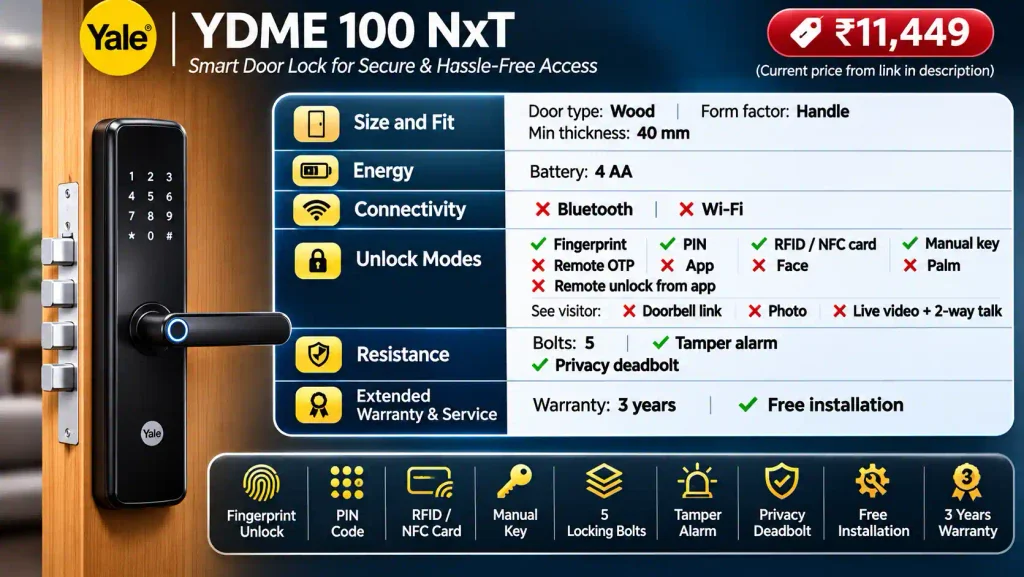
The Yale YDME 100 NxT covers the basics with fingerprint, PIN, RFID and key access. It uses four AA batteries and includes installation.
Its warning system blocks entry for three minutes after three incorrect password attempts. Like the Godrej, it has no app, so setup happens on the lock and access data stays there.
The critical compatibility check is door thickness: this model requires 36 to 40 mm. That narrower range can rule it out for older or thinner doors.
Both Yale and Godrej are recommendations primarily for buyers who value the brand. On features alone, several competing models offer more at similar prices.
Best for: A compatible door and a household that wants straightforward offline access from a familiar lock brand.
Best Premium Smart Locks in India (Above ₹20,000)
Premium models add conveniences such as 3D face recognition, remote app access, visitor communication and sleeker handleless designs. Buy one because those features solve a real need, not because the number of unlocking methods is higher.
Native Lock Ultra: Best Premium Smart Lock with 3D Face Recognition
Note: Price may change anytime. Click above to see the latest Amazon price and offers.
The Native Lock Ultra combines 3D face unlock with live video and two-way communication. Its face recognition works well in low light, which is useful in apartment corridors.
- Nine unlocking methods.
- Five bolts.
- Doorbell Connect integration.
- Door-not-closed alerts, auto-lock and child lock.
- Two rechargeable 5,000 mAh batteries.
The spare battery is a genuine advantage. Frequent face recognition and live-video use can drain the installed battery quickly, so having a charged replacement makes ownership easier.
The important limitation is recording: you can see live video, but the footage is not saved like it would be by a security camera or video doorbell.
Best for: Someone who wants to identify and speak to visitors before remotely opening the door, and is comfortable with regular charging.
Atomberg Cypheo Elite: Best Smart Lock with Palm and Face Unlocking
Note: Price may change anytime. Click above to see the latest Amazon price and offers.
The Atomberg Cypheo Elite is the only model on my shortlist with palm unlocking, alongside 3D face recognition and the usual access methods.
Its face and palm recognition use sensors rather than a camera. That gives you hands-free access, but it also means there is no visitor-photo or video capability.
- Built-in Wi-Fi for remote app unlocking.
- Five stainless steel bolts and a manual privacy deadbolt.
- Sleek handleless design.
- Rechargeable lithium-ion battery.
- Data stored in India, according to Atomberg.
I generally find Atomberg’s products sturdy, and this model has a distinctive feature set. My main complaint is that only one rechargeable battery is included. Two would make charging more convenient.
Best for: Buyers who want palm and face unlocking in a handleless design, without needing a visitor camera.
Best Budget Smart Locks in India (Under ₹10,000)
At this price, expect the essentials rather than face recognition or video. Bluetooth may be available, but Wi-Fi generally is not. Bolt counts are often lower too, although there are exceptions.
Atomberg Azhero: Best Budget Smart Lock for Thin Wooden Doors
Note: Price may change anytime. Click above to see the latest Amazon price and offers.
At just under ₹10,000, the Atomberg Azhero offers six access methods: fingerprint, PIN, OTP, NFC card, the Atomberg Home app and a mechanical key.
It fits wooden doors as thin as 28 mm, making it especially useful where thicker-door requirements rule out other options. Atomberg also claims Indian data storage and end-to-end encryption.
Battery life is a strong point. The Atomberg lock on my home-office door has gone more than two years without a battery replacement. That is my experience rather than a guarantee for every household, but it shows the appeal of a simpler Bluetooth setup.
The compromises are two stainless steel bolts and no direct remote app unlocking. You can still provide remote access through an OTP.
Best for: A budget-conscious household or home office that wants app convenience, good battery life and compatibility with a thinner wooden door.
Qubo Smart Door Lock Optima: Best Budget Offline Smart Lock with Four Bolts
Note: Price may change anytime. Click above to see the latest Amazon price and offers.
The Qubo Optima stands out by offering four bolts at a price where many competitors have only two.
Its access methods are fingerprint, passcode, RFID and a mechanical key. There is no app, so there are no remotely generated OTPs or remote unlocking features. Everything is stored on the lock.
Qubo includes installation in covered areas and a two-year warranty.
Best for: Someone who wants straightforward keyless entry and local data storage. If connected features are a priority, choose another model.
Best Rim Smart Locks for Metal and Wooden Doors
A rim lock sits on the door surface rather than inside a mortise cutout. This makes it worth considering for compatible metal doors or when you want to avoid extensive cutting into an existing door. It does not remove the need to check mounting and fabrication requirements.
MyGate Smart Lock Edge: Best Rim Smart Lock for Metal Doors
Note: Price may change anytime. Click above to see the latest Amazon price and offers.
The MyGate Smart Lock Edge supports wooden and metal doors from 25 to 65 mm thick. Installation is relatively straightforward and can take around 30 minutes where the door is ready for fitting.
If you also have an outer safety door, you need more than 45 mm of clearance between the two doors.
- Six access methods, including fingerprint, OTP, app and card access.
- Four AA batteries, with claimed use of more than six months.
- Optional MyGate Wi-Fi gateway for one-tap remote unlocking.
I consider the gateway optional unless direct remote app access is important to you.
The main installation caveat concerns metal doors: any required fabrication is not handled by the installation team. You will need to arrange that separately.
Best for: A compatible wooden or metal door where a surface-mounted lock makes more sense than a mortise model.
LAVNA LE50: An Alternative Rim Smart Lock for Buyers Who Can Arrange Installation
Note: Price may change anytime. Click above to see the latest Amazon price and offers.
The LAVNA LE50 offers six access methods, including fingerprint, Bluetooth app control, one-time OTP and RFID card access. It runs on two AA batteries and has two stainless steel bolts, one of which is a deadbolt.
The ownership experience is the main caution. Free installation is not included, so you need your own carpenter. LAVNA can guide the installer over a video call if necessary.
I also rate its service as average compared with the stronger brands on this shortlist.
Best for: Someone comfortable arranging installation and accepting a less comprehensive service experience.
Which Smart Lock Would I Choose?
For a typical main door, I would start in the ₹10,000 to ₹20,000 segment rather than immediately moving to a premium lock.
- Native Lock Pro: My choice when doorbell-triggered visitor photos, remote access and a three-year comprehensive warranty are useful.
- MyGate Smart Door Lock Plus: A strong value option under ₹15,000 if Bluetooth and remote passcodes cover your needs.
- Atomberg SL 1: Worth considering for its five bolts and manual privacy deadbolt without Wi-Fi complexity.
- Native Lock Ultra: The premium option when live visitor communication and 3D face unlock justify the charging routine.
- Atomberg Cypheo Elite: The distinctive choice for palm unlocking and a handleless design, not visitor video.
- Atomberg Azhero or Qubo Optima: My budget shortlist, depending on whether you want Bluetooth features or fully offline operation.
- MyGate Smart Lock Edge: The first rim model I would check for a compatible metal door.
Before ordering, confirm the exact door fit, installation coverage, emergency access method and warranty terms. Those details will matter far more in everyday use than an extra unlocking mode.
A good smart lock should make entering your home easier without making maintenance harder. Choose the simplest model that meets your actual needs, backed by service you can reach when you need it.
Pricing, Affiliate, and Sponsorship Disclosure:
All prices are subject to change and may be higher or lower than prevailing market prices. Ratingsage.com makes no guarantees regarding price accuracy. This content may include affiliate links and/or sponsored placements, through which we may receive compensation. Such compensation does not impact pricing or product representation. Consumers are responsible for verifying final prices with the retailer. 😊 Check: Affiliate Disclosure Page. and Discover more expert product reviews, buying guides, and appliance recommendations on our RatingSage Medium.com profile.