Urban Company Native Lock Ultra Review: A 3-in-1 Smart Lock With 3D Face Unlock, Camera & Doorbell
The Urban Company Native Lock Ultra combines a smart lock, video doorbell, and security camera into one device. Here’s our detailed review covering 3D face unlock, remote access, security features, battery life, pros, cons, and whether it’s worth buying.
Opening the front door sounds simple until your hands are full, your fingers are sweaty, or someone at home struggles with fingerprint recognition. That is exactly the kind of everyday friction a smart lock is supposed to solve.
The Native Lock Ultra by Urban Company tries to go a step further. It is not just a smart lock with multiple access methods. It also combines a camera, two-way communication, remote unlocking, and doorbell integration into a single product.
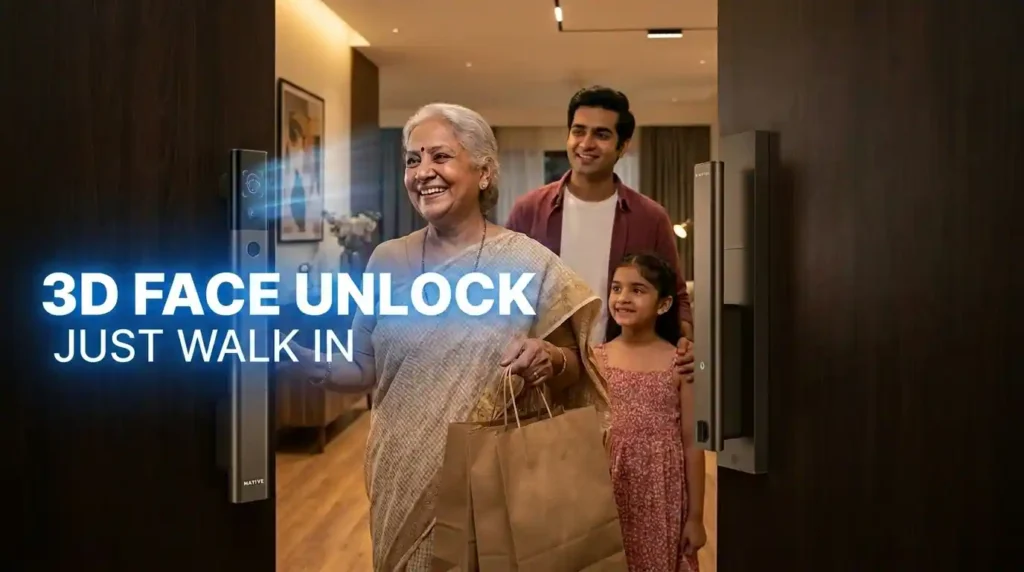
After living with an Urban Company smart lock for more than one and a half years, one thing stood out very clearly to me: fingerprint unlocking is incredibly convenient, but it is not equally convenient for everyone. That is where this new lock makes its biggest upgrade. The standout feature here is 3D face unlock, and it makes a real difference in day-to-day use.
What Makes the Native Lock Ultra Stand Out
Most smart locks stop at access control. They let you unlock your door through a fingerprint, PIN, app, or key, and that is about it.
The Native Lock Ultra is positioned differently. It is meant to replace multiple things at once:
- A traditional door lock
- A smart lock
- A video doorbell setup
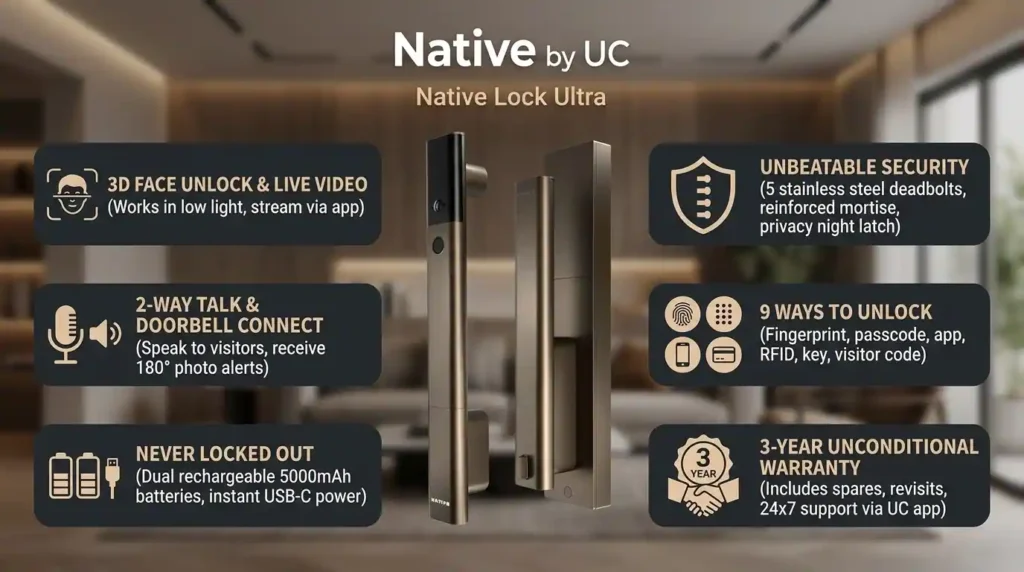
That three-in-one approach is the main selling point. Instead of installing separate devices and then trying to make them work together, this product is designed to handle the whole front-door experience by itself.
How the 3D Face Unlock Works in Daily Use
If you have used a smart lock before, you probably know how satisfying fingerprint unlock can be. Just tap and enter. But that convenience depends on the fingerprint sensor being able to consistently recognize your finger.
That is not always the case for older family members. In my own experience, my mom had difficulty using fingerprint unlock. A practical reason for that is that fingerprints can become harder to read as we age, which makes recognition less reliable.
This is where the face unlock on the Native Lock Ultra becomes genuinely useful rather than just flashy.
Urban Company is using 3D depth mapping for facial recognition here. That matters because it is not simply matching a flat image. It is reading the depth and contours of a face. So a printed photo, or even a face displayed on a phone screen, should not be enough to unlock it.
In daily use, the idea is simple: stand in front of the lock and it unlocks the door. No fumbling with keys. No awkward attempts at fingerprint scans when your hands are sweaty. No balancing groceries while trying to type a PIN.
Access modes available
Face unlock is the big differentiator, but the lock still includes all the standard methods you would expect:
- 3D face unlock
- Fingerprint unlock
- PIN access
- RFID access
- Manual key
That mix is important because a front-door lock should be flexible. Not every person in the house will want to use the same method, and backup options matter.
Built-In Camera, Two-Way Talk, and Remote Unlocking
This is the part where the Native Lock Ultra starts separating itself from a lot of other smart locks in the market.
Urban Company already had a useful feature on the Native Lock Pro that could capture a visitor photo when the bell was rung. The Ultra builds on that idea in a much bigger way.
With this lock, when someone rings the bell, you can:
- See live video of the person at the door
- Talk to them directly through the lock
- Listen to their response
- Remotely unlock the door if needed
That means you do not need a separate video doorbell setup just to know who is outside. The lock itself handles that interaction.
How Bell Link Connects With Your Existing Doorbell
One of the more interesting features here is what Urban Company calls Bell Link technology. The idea is that the lock can integrate with your existing doorbell setup.
So instead of buying:
- a smart lock,
- a separate video doorbell, and
- some method of making those devices work together,
the Native Lock Ultra aims to handle all of it in one system.
That is a practical benefit, not just a feature-list benefit. Fewer devices usually means less clutter, less installation complexity, and fewer apps to manage.
When Remote Unlocking Becomes Truly Useful
Remote unlocking can sound like a niche feature until you start thinking about the number of times it helps in a regular week.
A very real example is opening the door for household help when you are not at home. If someone trusted arrives, you can check the live video, verify who it is, and unlock the door from the app.
You can also unlock the door on demand even without a bell press or a trigger, which is useful if a friend or family member calls and says they are waiting outside.
Live Video Access and Connectivity Features
The Native Lock Ultra is described as always connected, and that opens up a few useful scenarios.
If something feels suspicious, you can open the app and check the live footage outside your door. If someone says they have arrived, you can verify that instantly. If you need to unlock remotely, you can do it directly from the app.
That said, there is one limitation worth knowing: the live footage is not stored for later viewing.
So this is more of a live access and live verification system than a full security camera archive. If you want recorded footage history, that is not something highlighted here.
Battery life and what happens if the battery dies
This is one of the most common concerns people have with smart locks, and fairly so. A smart lock is great right up until someone asks the obvious question: what if the battery dies while I am outside?
Urban Company has addressed this in a few ways.
Battery Capacity and Charging
The lock comes with two rechargeable 5000mAh batteries, and the claimed battery life is over two months.
You can also check battery status directly in the app, which means you do not have to guess when charging is due.
What Happens if the Battery Runs Out
If the battery drains unexpectedly while you are away from home, there are still ways to get in:
- Jump start it using a USB-C cable and a power bank
- Use the physical key, if you have it with you
That combination is reassuring because it avoids the nightmare scenario people usually imagine with electronic locks.
Security features and build quality
Convenience is only half the story with a smart lock. If it is going on your main door, security matters even more.
Urban Company has clearly tried to address that concern through both physical construction and active alerts.
Stronger locking mechanism
The Native Lock Ultra uses five bolts, whereas many traditional locks use only two or three bolts. More locking points can add resistance compared to basic setups.
It also includes a dead bolt, which ensures the lock cannot be opened from the outside when the dead bolt is engaged.
Inner lock mechanism for added protection
From the outside, the lock looks sleek and modern. But importantly, the main locking mechanism sits on the inner panel and is not directly accessible from the exterior.
That design matters because it reduces exposure to tampering attempts from outside the door.
Strike plate and forced-entry resistance
The strike plate, which is the fixture mounted on the door frame, has also been tested by Urban Company to resist excessive force.
For a front-door product, details like this matter more than flashy app screenshots. The hardware has to be taken seriously first.
Anti-Tamper and Break-In Alerts
If someone does try to interfere with the lock, it can trigger an anti-tamper and anti-break alarm. That includes:
- A physical alarm on the lock
- A notification sent to your phone
That immediate alert can be useful because it does not leave you dependent on discovering a problem much later.
Lurker Detection Alerts
One of the more unusual and interesting features is the lurker alarm.
If the lock detects someone lingering outside the door for too long, it can:
- Trigger a physical alarm on the device
- Send an alert to your phone
That is not a feature you see on every smart lock, and it fits nicely with the camera-first design of the Ultra.
Door Status Notifications
If someone forgets to close the door properly, the app can alert you. You can also check the live status of the door in the app.
That is especially useful in homes with children or in busy households where the door may not always be checked carefully.
Urban Company App Experience and Smart Controls
Another welcome detail is that the lock works through the Urban Company app itself. There is no need to install and manage another separate app just for the lock.
From the app, you can:
- Check battery health
- See who is at the door
- Use two-way talk
- Remotely unlock the door
- Enable a child lock
- Check the door status
- Manage users and access methods
User Capacity and Access Management
Urban Company allows up to:
- 50 users for face unlock
- 100 users for fingerprint and other access modes
That is more than enough for most homes, and it gives flexibility for families, staff, and extended access setups.
Design, Installation, and Door Compatibility
The Native Lock Ultra has a sleek look and a distinctive grab-handle design, which helps it stand out from the usual bulky smart lock designs.
As for installation, Urban Company offers free installation by trained technicians. The service is available across 14,000+ pin codes in India.
For locations where Urban Company does not operate, installation can still be done by a local carpenter, and the lock comes with an installation guide.
One practical point worth noting: if you are replacing an older lock, you may need some touch-up work on the door depending on your existing lock cutout and hardware layout.
Privacy, Encryption, and Data Handling
Urban Company says the data is end-to-end encrypted and stored on Urban Company servers. Everything is accessed from the same app many people may already be comfortable using.
That single-app approach is nice from a usability standpoint, though anyone considering a connected lock should still think carefully about their own comfort level with cloud-connected home access products.
Pros and cons
What Works Well
- 3D face unlock is genuinely useful and solves a real problem for people who struggle with fingerprints
- Multiple unlock methods make it flexible for different users
- Live video, two-way talk, and remote unlock add real everyday value
- Bell Link integration reduces the need for separate front-door devices
- Good battery fallback options including USB-C jump start and physical key
- Strong security features including five bolts, dead bolt, anti-tamper alerts, lurker alarm, and door-open alerts
- No extra app required
- Free installation in a large number of serviceable areas
- 3-year unconditional warranty adds peace of mind
Things to Consider Before Buying
- Live video is not stored for later review
- If replacing an old lock, door touch-up work may be needed
- The price is on the premium side compared to a basic smart lock
Who Should Buy the Native Lock Ultra
This lock makes the most sense for people who want convenience and security without managing multiple devices.
It is especially worth considering if:
- You want face unlock instead of depending only on fingerprints
- You have family members who struggle with fingerprint recognition
- You want to see and speak to visitors remotely
- You regularly need to open the door for trusted people while away
- You prefer a single integrated app experience over separate gadgets and ecosystems
If all you want is a basic smart lock and nothing else, this may be more than you need. But if you are trying to upgrade the whole front-door experience in one shot, the feature set starts making a lot of sense.
Price, Warranty, and After-Sales Support
At the time of review, the Native Lock Ultra was available for around ₹25,000 on Amazon, Flipkart, and Urban Company’s own app.
It also comes with a 3-year unconditional warranty covering spares and service visits, which does strengthen the value proposition for a product like this. For smart home hardware, after-sales support matters almost as much as the hardware itself.
Final Verdict: Is the Native Lock Ultra Worth Buying?
The Native Lock Ultra by Urban Company is not trying to be just another smart lock. Its appeal comes from combining smart access, front-door communication, and visitor verification into one polished system.
The biggest win here is still the 3D face unlock. It feels practical, not gimmicky, and it solves an accessibility issue that fingerprint-only systems often overlook.
Add to that the live video, two-way talk, remote opening, security alerts, door status checks, and integrated app experience, and this becomes a compelling package for homes that want both convenience and peace of mind.
If you are looking for a 3-in-1 smart lock, camera, and doorbell solution and do not want to compromise much on either convenience or security, the Native Lock Ultra is a very strong option.
Pricing, Affiliate, and Sponsorship Disclosure:
All prices are subject to change and may be higher or lower than prevailing market prices. We make no guarantees regarding price accuracy. This content may include affiliate links and/or sponsored placements, through which we may receive compensation. Such compensation does not impact pricing or product representation. Consumers are responsible for verifying final prices with the retailer. 😊 Check: Affiliate Disclosure Page. and check out another social media account: Click Here.